


Box MCP connector
OAuth 2.1Files & DocumentsProductivityConnect to Box via MCP to manage files, folders, collaborations, users, groups, tasks, comments, and search content directly from your AI workflows.
Box MCP connector
-
Install the SDK
Section titled “Install the SDK”Terminal window npm install @scalekit-sdk/nodeTerminal window pip install scalekit -
Set your credentials
Section titled “Set your credentials”Add your Scalekit credentials to your
.envfile. Find values in app.scalekit.com > Developers > API Credentials..env SCALEKIT_ENVIRONMENT_URL=<your-environment-url>SCALEKIT_CLIENT_ID=<your-client-id>SCALEKIT_CLIENT_SECRET=<your-client-secret> -
Set up the connector
Section titled “Set up the connector”Dashboard setup steps
Register your Scalekit environment with Box MCP so Scalekit handles the OAuth flow and token lifecycle for your users. Create a Box OAuth application, then add its Client ID and Client Secret to your Scalekit connection.
-
Copy the redirect URI from Scalekit
-
In the Scalekit dashboard, go to AgentKit > Connections > Create Connection. Find Box MCP and click Create.
-
Click Use your own credentials and copy the redirect URI. It looks like
https://<SCALEKIT_ENVIRONMENT_URL>/sso/v1/oauth/<CONNECTION_ID>/callback.
-
-
Create or open a Box OAuth app
-
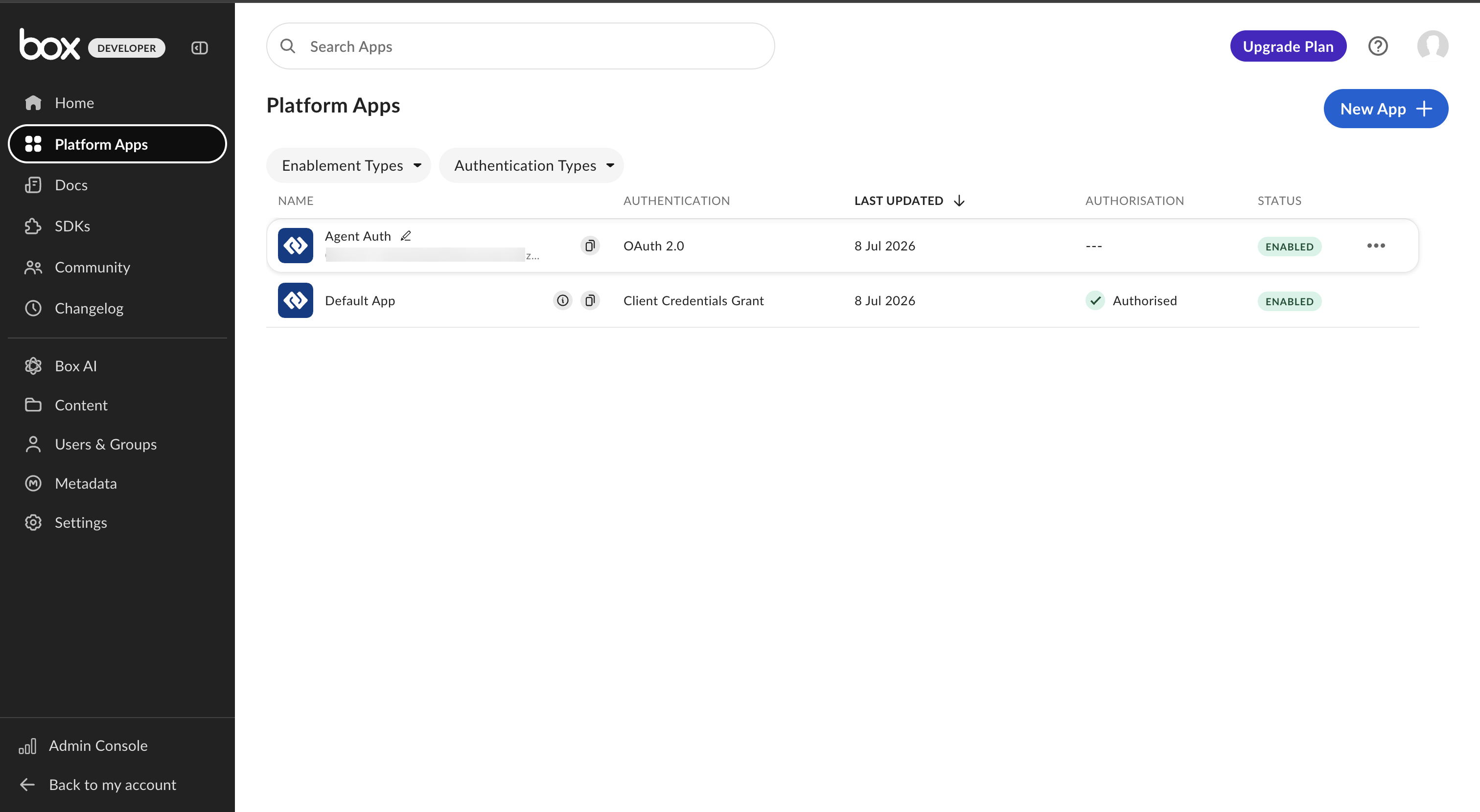
Go to the Box Developer Console and click Platform Apps in the sidebar.
-
Click New App to create one, or open an existing app that uses OAuth 2.0 authentication.
-
-
Add the redirect URI
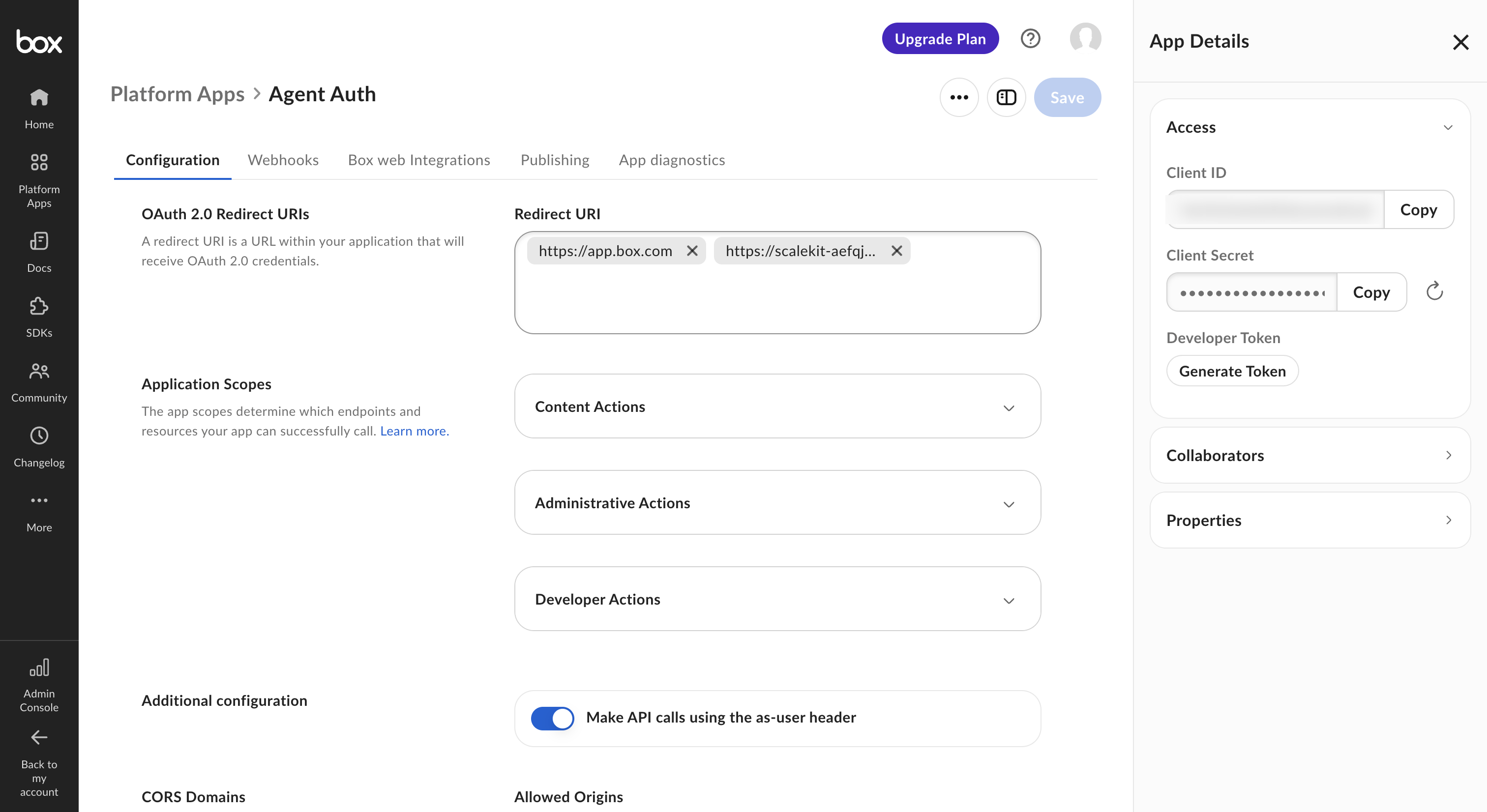
- Open the app’s Configuration tab.
- Under OAuth 2.0 Redirect URIs, paste the redirect URI you copied from Scalekit and click Save.
-
Copy your Client ID and Client Secret
-
In the App Details panel, copy the Client ID.
-
Click Copy next to Client Secret to copy it.
-
-
Add credentials in Scalekit
- Return to the connection you created in Scalekit and enter:
- Client ID — from your Box app
- Client Secret — from your Box app
- Click Save.
- Return to the connection you created in Scalekit and enter:
-
-
Authorize and make your first call
Section titled “Authorize and make your first call”quickstart.ts import { ScalekitClient } from '@scalekit-sdk/node'import 'dotenv/config'const scalekit = new ScalekitClient(process.env.SCALEKIT_ENV_URL,process.env.SCALEKIT_CLIENT_ID,process.env.SCALEKIT_CLIENT_SECRET,)const actions = scalekit.actionsconst connector = 'boxmcp'const identifier = 'user_123'// Generate an authorization link for the userconst { link } = await actions.getAuthorizationLink({ connectionName: connector, identifier })console.log('Authorize Box MCP:', link)process.stdout.write('Press Enter after authorizing...')await new Promise(r => process.stdin.once('data', r))// Make your first callconst result = await actions.executeTool({connector,identifier,toolName: 'boxmcp_list_hubs',toolInput: {},})console.log(result)quickstart.py import osfrom scalekit.client import ScalekitClientfrom dotenv import load_dotenvload_dotenv()scalekit_client = ScalekitClient(env_url=os.getenv("SCALEKIT_ENV_URL"),client_id=os.getenv("SCALEKIT_CLIENT_ID"),client_secret=os.getenv("SCALEKIT_CLIENT_SECRET"),)actions = scalekit_client.actionsconnection_name = "boxmcp"identifier = "user_123"# Generate an authorization link for the userlink_response = actions.get_authorization_link(connection_name=connection_name,identifier=identifier,)print("Authorize Box MCP:", link_response.link)input("Press Enter after authorizing...")# Make your first callresult = actions.execute_tool(tool_input={},tool_name="boxmcp_list_hubs",connection_name=connection_name,identifier=identifier,)print(result)
What you can do
Section titled “What you can do”Connect this agent connector to let your agent:
- Hub add items to, ai qa, copy — Adds files or folders to an existing Box Hub
- Freeform ai extract — Extracts data from a Box file using a freeform AI prompt
- Fields ai extract structured from — Extracts structured data from a Box file using AI based on specified field definitions
- Enhanced ai extract structured from fields, ai extract structured from metadata template — Enhanced version of AI structured extraction from fields
- Template ai extract structured from metadata — Extracts structured data from a Box file using AI based on an existing metadata template schema
- File ai qa multi, ai qa single, copy — Asks a question across multiple Box files using Box AI
Tool list
Section titled “Tool list”Use the exact tool names from the Tool list below when you call execute_tool. If you’re not sure which name to use, list the tools available for the current user first.
boxmcp_add_items_to_hub#Adds files or folders to an existing Box Hub.2 params
Adds files or folders to an existing Box Hub.
hub_idstringrequiredThe unique identifier of the Box Hub to add items to.itemsarrayrequiredA list of items (files or folders) to add to the hub. Each item must include an 'id' and a 'type'.boxmcp_ai_extract_freeform#Extracts data from a Box file using a freeform AI prompt. Returns unstructured extracted information based on the prompt.2 params
Extracts data from a Box file using a freeform AI prompt. Returns unstructured extracted information based on the prompt.
file_idstringrequiredThe ID of the Box file to extract data from.promptstringrequiredA freeform prompt describing what data to extract.boxmcp_ai_extract_structured_from_fields#Extracts structured data from a Box file using AI based on specified field definitions. Returns structured key-value pairs.2 params
Extracts structured data from a Box file using AI based on specified field definitions. Returns structured key-value pairs.
fieldsarrayrequiredField definitions specifying what structured data to extract.file_idstringrequiredThe ID of the Box file to extract structured data from.boxmcp_ai_extract_structured_from_fields_enhanced#Enhanced version of AI structured extraction from fields. Extracts structured data from a Box file using AI with additional processing options.2 params
Enhanced version of AI structured extraction from fields. Extracts structured data from a Box file using AI with additional processing options.
fieldsarrayrequiredField definitions specifying what structured data to extract.file_idstringrequiredThe ID of the Box file to extract structured data from.boxmcp_ai_extract_structured_from_metadata_template#Extracts structured data from a Box file using AI based on an existing metadata template schema.3 params
Extracts structured data from a Box file using AI based on an existing metadata template schema.
file_idstringrequiredThe ID of the Box file to extract data from.template_keystringrequiredThe key of the metadata template to use for structured extraction.scopestringoptionalThe scope of the metadata template.boxmcp_ai_extract_structured_from_metadata_template_enhanced#Enhanced version of AI structured extraction using a metadata template. Extracts data from a Box file using AI with additional processing options.3 params
Enhanced version of AI structured extraction using a metadata template. Extracts data from a Box file using AI with additional processing options.
file_idstringrequiredThe ID of the Box file to extract data from.template_keystringrequiredThe key of the metadata template to use for structured extraction.scopestringoptionalThe scope of the metadata template.boxmcp_ai_qa_hub#Asks a question about the content of a Box Hub using Box AI. Returns an AI-generated answer based on the hub's content.2 params
Asks a question about the content of a Box Hub using Box AI. Returns an AI-generated answer based on the hub's content.
hub_idstringrequiredThe unique identifier of the Box Hub to query with AI.promptstringrequiredThe question or prompt to ask Box AI about the hub's content.boxmcp_ai_qa_multi_file#Asks a question across multiple Box files using Box AI. Returns an AI-generated answer synthesized from all provided files.2 params
Asks a question across multiple Box files using Box AI. Returns an AI-generated answer synthesized from all provided files.
file_idsarrayrequiredThe IDs of the Box files to ask a question about.promptstringrequiredThe question to ask Box AI about the files.boxmcp_ai_qa_single_file#Asks a question about a single Box file using Box AI. Returns an AI-generated answer based on the file's content.2 params
Asks a question about a single Box file using Box AI. Returns an AI-generated answer based on the file's content.
file_idstringrequiredThe ID of the Box file to ask a question about.promptstringrequiredThe question to ask Box AI about the file.boxmcp_copy_file#Creates a copy of a Box file in the specified destination folder.3 params
Creates a copy of a Box file in the specified destination folder.
file_idstringrequiredThe ID of the Box file to copy.parent_idstringrequiredThe ID of the destination folder for the copied file.namestringoptionalThe new name for the copied file. Defaults to the original name if not provided.boxmcp_copy_folder#Creates a copy of a Box folder and all its contents in the specified destination folder.3 params
Creates a copy of a Box folder and all its contents in the specified destination folder.
folder_idstringrequiredThe ID of the Box folder to copy.parent_idstringrequiredThe ID of the destination folder where the copy will be placed.namestringoptionalThe new name for the copied folder. Defaults to the original name if not provided.boxmcp_copy_hub#Creates a copy of a Box Hub with all its items.2 params
Creates a copy of a Box Hub with all its items.
hub_idstringrequiredThe unique identifier of the Box Hub to copy.namestringoptionalThe name for the copied hub. Defaults to the original hub's name if not provided.boxmcp_create_file_comment#Adds a comment to a Box file.2 params
Adds a comment to a Box file.
file_idstringrequiredThe ID of the Box file to comment on.messagestringrequiredThe text content of the comment.boxmcp_create_folder#Creates a new folder in Box under the specified parent folder.2 params
Creates a new folder in Box under the specified parent folder.
namestringrequiredThe name of the new folder.parent_idstringrequiredThe ID of the parent folder. Use '0' for the root folder.boxmcp_create_hub#Creates a new Box Hub. Hubs are curated content collections for organizing and sharing resources.2 params
Creates a new Box Hub. Hubs are curated content collections for organizing and sharing resources.
namestringrequiredThe name of the new hub.descriptionstringoptionalAn optional description for the new hub.boxmcp_create_metadata_template#Creates a new metadata template in the Box enterprise. Defines custom fields for tagging and organizing files.5 params
Creates a new metadata template in the Box enterprise. Defines custom fields for tagging and organizing files.
display_namestringrequiredThe human-readable name of the metadata template.fieldsarrayoptionalAn array of field definitions for the metadata template.hiddenbooleanoptionalWhether the metadata template is hidden from users in the Box UI.scopestringoptionalThe scope of the metadata template. Defaults to 'enterprise'.template_keystringoptionalThe unique machine-readable key for the metadata template. Auto-generated from display_name if not provided.boxmcp_get_file_content#Retrieves the text content of a Box file by its ID. Useful for reading documents, notes, and other text-based files.1 param
Retrieves the text content of a Box file by its ID. Useful for reading documents, notes, and other text-based files.
file_idstringrequiredThe ID of the Box file to retrieve content from.boxmcp_get_file_details#Retrieves detailed metadata about a specific Box file including name, size, timestamps, owner, and other properties.2 params
Retrieves detailed metadata about a specific Box file including name, size, timestamps, owner, and other properties.
file_idstringrequiredThe ID of the Box file to retrieve details for.fieldsarrayoptionalList of additional fields to include in the response.boxmcp_get_file_preview#Retrieves a preview of a Box file, returning preview page information and total page count.2 params
Retrieves a preview of a Box file, returning preview page information and total page count.
file_idstringrequiredThe unique identifier of the Box file to preview.version_idstringoptionalThe ID of a specific file version to preview. If omitted, the current version is used.boxmcp_get_folder_details#Retrieves detailed metadata about a specific Box folder including name, size, timestamps, owner, and other properties.2 params
Retrieves detailed metadata about a specific Box folder including name, size, timestamps, owner, and other properties.
folder_idstringrequiredThe ID of the Box folder to retrieve details for.fieldsarrayoptionalList of additional fields to include in the response.boxmcp_get_hub_details#Retrieves detailed information about a specific Box Hub including its name, description, and settings.1 param
Retrieves detailed information about a specific Box Hub including its name, description, and settings.
hub_idstringrequiredThe unique identifier of the Box Hub to retrieve details for.boxmcp_get_hub_items#Retrieves the items (files and folders) contained in a specific Box Hub.3 params
Retrieves the items (files and folders) contained in a specific Box Hub.
hub_idstringrequiredThe unique identifier of the Box Hub whose items to retrieve.limitintegeroptionalThe maximum number of items to return per page.markerstringoptionalA pagination cursor returned from a previous call to continue listing from a specific position.boxmcp_get_metadata_template_schema#Retrieves the schema definition for a specific metadata template in Box, including all field definitions, types, and options.2 params
Retrieves the schema definition for a specific metadata template in Box, including all field definitions, types, and options.
scopestringrequiredThe scope of the metadata template.template_keystringrequiredThe unique key identifying the metadata template.boxmcp_get_preview_page#Retrieves the content of a specific page in a Box file preview (for multi-page documents like PDFs).3 params
Retrieves the content of a specific page in a Box file preview (for multi-page documents like PDFs).
file_idstringrequiredThe unique identifier of the Box file.pageintegerrequiredThe 1-based page number to retrieve from the file preview.version_idstringoptionalThe ID of a specific file version to preview. If omitted, the current version is used.boxmcp_list_file_comments#Retrieves all comments associated with a specific Box file.4 params
Retrieves all comments associated with a specific Box file.
file_idstringrequiredThe ID of the Box file to list comments for.fieldsarrayoptionalList of fields to include in each comment in the response.limitintegeroptionalMaximum number of comments to return.offsetintegeroptionalThe offset of the comment at which to begin the response.boxmcp_list_folder_content_by_folder_id#Lists files, folders, and web links contained in a folder. Returns a paginated list. Use folder_id "0" for the root folder.4 params
Lists files, folders, and web links contained in a folder. Returns a paginated list. Use folder_id "0" for the root folder.
folder_idstringrequiredThe ID of the folder to list contents of. Use "0" for the root folder.fieldsarrayoptionalList of fields to include in the response for each item.limitintegeroptionalMaximum number of items to return.offsetintegeroptionalThe offset of the item at which to begin the response.boxmcp_list_hubs#Lists all Box Hubs accessible to the authenticated user. Box Hubs are curated collections of content.2 params
Lists all Box Hubs accessible to the authenticated user. Box Hubs are curated collections of content.
limitintegeroptionalThe maximum number of hubs to return per page. Defaults to 100, maximum is 1000.markerstringoptionalA pagination cursor returned from a previous call to continue listing from a specific position.boxmcp_list_item_collaborations#Lists all collaborations (shared access) on a Box file or folder, showing who has access and their permission level.5 params
Lists all collaborations (shared access) on a Box file or folder, showing who has access and their permission level.
item_idstringrequiredThe ID of the Box file or folder to list collaborations for.item_typestringrequiredThe type of the item: 'file' or 'folder'.fieldsarrayoptionalList of fields to include in each collaboration in the response.limitintegeroptionalMaximum number of collaborations to return.offsetintegeroptionalThe offset at which to begin the response.boxmcp_list_metadata_templates#Lists all metadata templates available in the Box enterprise or global scope.3 params
Lists all metadata templates available in the Box enterprise or global scope.
scopestringrequiredThe scope of metadata templates to list: 'global' or 'enterprise'.limitintegeroptionalMaximum number of metadata templates to return.markerstringoptionalA pagination marker for fetching the next page of results.boxmcp_list_tasks#Lists tasks assigned to the authenticated user or associated with a specific file in Box.1 param
Lists tasks assigned to the authenticated user or associated with a specific file in Box.
file_idstringrequiredThe ID of the Box file to list tasks for.boxmcp_move_file#Moves a Box file to a different folder.2 params
Moves a Box file to a different folder.
file_idstringrequiredThe ID of the Box file to move.parent_idstringrequiredThe ID of the destination folder to move the file into.boxmcp_move_folder#Moves a Box folder and all its contents to a different parent folder.2 params
Moves a Box folder and all its contents to a different parent folder.
folder_idstringrequiredThe ID of the Box folder to move.parent_idstringrequiredThe ID of the destination parent folder.boxmcp_search_files_keyword#Searches for files using keywords with support for metadata filters, file extension filtering, and field selection. Maps to Box's searchForContent API.7 params
Searches for files using keywords with support for metadata filters, file extension filtering, and field selection. Maps to Box's searchForContent API.
querystringrequiredThe keyword or phrase to search for in file names and content.ancestor_folder_idstringoptionalID of a parent folder to scope the search within.created_at_rangestringoptionalFilter files by creation date range (ISO 8601 range string).fieldsarrayoptionalList of fields to include in the response for each file.file_extensionsarrayoptionalList of file extensions to filter results by.limitintegeroptionalMaximum number of files to return.updated_at_rangestringoptionalFilter files by last updated date range (ISO 8601 range string).boxmcp_search_files_metadata#Searches for files in Box based on metadata template values. Filter files by specific metadata field values.6 params
Searches for files in Box based on metadata template values. Filter files by specific metadata field values.
fromstringrequiredThe metadata template to search against in 'scope.templateKey' format.ancestor_folder_idstringoptionalLimit search results to items in a specific folder.fieldsarrayoptionalMetadata fields to return in the results.limitintegeroptionalMaximum number of results to return (max 200).querystringoptionalA SQL-like query to filter metadata fields.query_paramsobjectoptionalParameters for the query placeholders.boxmcp_search_folders_by_name#Searches for folders by name within Box using keyword matching. Can be scoped to search within a particular parent folder. Returns basic folder information including ID, type, and name.5 params
Searches for folders by name within Box using keyword matching. Can be scoped to search within a particular parent folder. Returns basic folder information including ID, type, and name.
folder_namestringrequiredThe name or keyword to search for in folder names.ancestor_folder_idstringoptionalID of a parent folder to scope the search within.created_at_rangestringoptionalFilter folders by creation date range (ISO 8601 range string).limitintegeroptionalMaximum number of folders to return.updated_at_rangestringoptionalFilter folders by last updated date range (ISO 8601 range string).boxmcp_set_file_metadata#Sets or updates metadata on a Box file using a specified metadata template. Creates or replaces the metadata instance.4 params
Sets or updates metadata on a Box file using a specified metadata template. Creates or replaces the metadata instance.
file_idstringrequiredThe ID of the Box file to set metadata on.metadataobjectrequiredKey-value pairs of metadata fields matching the template's field definitions.scopestringrequiredThe scope of the metadata template. Either 'global' or 'enterprise'.template_keystringrequiredThe key of the metadata template to use.boxmcp_set_folder_metadata#Sets or updates metadata on a Box folder using a specified metadata template. Creates or replaces the metadata instance.4 params
Sets or updates metadata on a Box folder using a specified metadata template. Creates or replaces the metadata instance.
folder_idstringrequiredThe ID of the Box folder to set metadata on.metadataobjectrequiredKey-value pairs of metadata fields matching the template's field definitions.scopestringrequiredThe scope of the metadata template. Either 'global' or 'enterprise'.template_keystringrequiredThe key of the metadata template to use.boxmcp_update_file_properties#Updates properties of a Box file such as name, description, or tags.4 params
Updates properties of a Box file such as name, description, or tags.
file_idstringrequiredThe ID of the Box file to update.descriptionstringoptionalThe new description for the file.namestringoptionalThe new name for the file.tagsarrayoptionalA list of tags to set on the file.boxmcp_update_folder_properties#Updates properties of a Box folder such as name or description.3 params
Updates properties of a Box folder such as name or description.
folder_idstringrequiredThe ID of the Box folder to update.descriptionstringoptionalThe new description for the folder.namestringoptionalThe new name for the folder.boxmcp_update_hub#Updates the properties of an existing Box Hub, such as its name or description.3 params
Updates the properties of an existing Box Hub, such as its name or description.
hub_idstringrequiredThe unique identifier of the Box Hub to update.descriptionstringoptionalThe new description for the hub. Leave empty to keep the existing description.namestringoptionalThe new name for the hub. Leave empty to keep the existing name.boxmcp_update_metadata_template#Updates an existing metadata template in Box, such as adding, modifying, or reordering fields.3 params
Updates an existing metadata template in Box, such as adding, modifying, or reordering fields.
operationsarrayrequiredA list of operations to perform on the metadata template, such as adding, editing, or reordering fields.template_keystringrequiredThe unique key of the metadata template to update.scopestringoptionalThe scope of the metadata template. Use 'global' for Box-defined templates or 'enterprise' for custom templates.boxmcp_upload_file#Uploads a new file to a Box folder. Provide the file content as text and specify the target folder and file name.3 params
Uploads a new file to a Box folder. Provide the file content as text and specify the target folder and file name.
contentstringrequiredThe file content as text.file_namestringrequiredThe name to give the uploaded file.folder_idstringrequiredThe ID of the Box folder to upload the file into.boxmcp_upload_file_version#Uploads a new version of an existing Box file. Replaces the current version with new content.3 params
Uploads a new version of an existing Box file. Replaces the current version with new content.
contentstringrequiredThe new file content as text.file_idstringrequiredThe ID of the existing Box file to upload a new version for.file_namestringoptionalOptional new name for the file version.boxmcp_who_am_i#Returns detailed information about the currently authenticated Box user, including user profile data, identification, contact information, role details, and account settings. No input parameters required.0 params
Returns detailed information about the currently authenticated Box user, including user profile data, identification, contact information, role details, and account settings. No input parameters required.