


v0 MCP connector
Bearer TokenAIDeveloper ToolsDesignConnect to v0 by Vercel to generate and iterate on web app UIs from natural language. Create chats, send follow-up messages, and inspect v0 Platform chats...
v0 MCP connector
-
Install the SDK
Section titled “Install the SDK”Terminal window npm install @scalekit-sdk/nodeTerminal window pip install scalekit -
Set your credentials
Section titled “Set your credentials”Add your Scalekit credentials to your
.envfile. Find values in app.scalekit.com > Developers > API Credentials..env SCALEKIT_ENVIRONMENT_URL=<your-environment-url>SCALEKIT_CLIENT_ID=<your-client-id>SCALEKIT_CLIENT_SECRET=<your-client-secret> -
Set up the connector
Section titled “Set up the connector”Register your v0 MCP credentials with Scalekit so it can authenticate requests on your behalf. You do this once per environment.
Dashboard setup steps
Register your v0 API key with Scalekit so it can authenticate and proxy requests on behalf of your users. v0 MCP uses Bearer Token authentication — there is no redirect URI or OAuth flow.
-
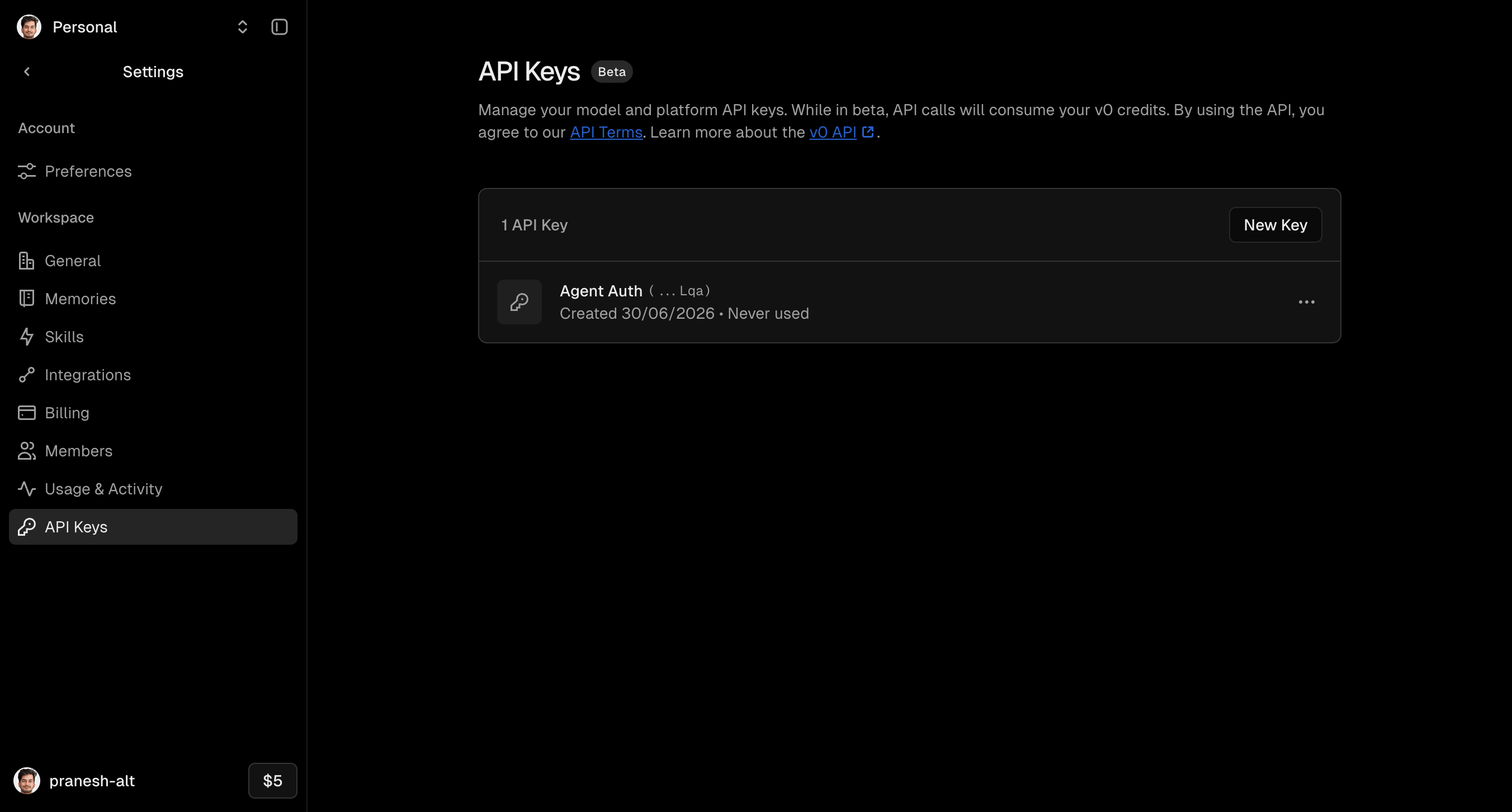
Get a v0 API key
- Go to v0.dev and sign in to your account.
- Click your workspace name in the top-left corner and select Settings.
- In the left sidebar, click API Keys.
- Click New Key, give it a name (e.g.
Agent Auth), and copy the generated key.
-
Create a connection in Scalekit
- In the Scalekit dashboard, go to AgentKit → Connections → Create Connection.
- Search for v0 MCP and click Create.
- Note the Connection name — use this as
connection_namein your code (e.g.,v0mcp).
-
Add a connected account
Connected accounts link a specific user identifier in your system to a v0 API key. Add them via the dashboard for testing, or via the Scalekit API in production.
Via dashboard (for testing)
- Open the connection and click the Connected Accounts tab → Add account.
- Fill in Your User’s ID and API Key, then click Save.
Via API (for production)
await scalekit.connect.upsertConnectedAccount({connectionName: 'v0mcp',identifier: 'user@example.com',credentials: { token: 'your-v0-api-key' },})scalekit_client.connect.upsert_connected_account(connection_name="v0mcp",identifier="user@example.com",credentials={"token": "your-v0-api-key"},)
-
-
Make your first call
Section titled “Make your first call”quickstart.ts import { ScalekitClient } from '@scalekit-sdk/node'import 'dotenv/config'const scalekit = new ScalekitClient(process.env.SCALEKIT_ENV_URL,process.env.SCALEKIT_CLIENT_ID,process.env.SCALEKIT_CLIENT_SECRET,)const actions = scalekit.actionsconst connector = 'v0mcp'const identifier = 'user_123'// Make your first callconst result = await actions.executeTool({connector,identifier,toolName: 'v0mcp_findchats',toolInput: {},})console.log(result)quickstart.py import osfrom scalekit.client import ScalekitClientfrom dotenv import load_dotenvload_dotenv()scalekit_client = ScalekitClient(env_url=os.getenv("SCALEKIT_ENV_URL"),client_id=os.getenv("SCALEKIT_CLIENT_ID"),client_secret=os.getenv("SCALEKIT_CLIENT_SECRET"),)actions = scalekit_client.actionsconnection_name = "v0mcp"identifier = "user_123"# Make your first callresult = actions.execute_tool(tool_input={},tool_name="v0mcp_findchats",connection_name=connection_name,identifier=identifier,)print(result)
What you can do
Section titled “What you can do”Connect this agent connector to let your agent:
- Sendchatmessage records — Send a new message to an existing chat using the v0 Platform API
- Getuser records — Get user information using the v0 Platform API
- Getchat records — Get a specific chat by ID using the v0 Platform API
- Findchats records — Find all chats using the v0 Platform API
- Createchat records — Create a new chat using the v0 Platform API
Tool list
Section titled “Tool list”Use the exact tool names from the Tool list below when you call execute_tool. If you’re not sure which name to use, list the tools available for the current user first.
v0mcp_createchat#Create a new chat using the v0 Platform API. Starts a fresh v0 conversation from an initial message and returns the created chat, including generated UI and a chat ID you can use with v0mcp_getchat or v0mcp_sendchatmessage.8 params
Create a new chat using the v0 Platform API. Starts a fresh v0 conversation from an initial message and returns the created chat, including generated UI and a chat ID you can use with v0mcp_getchat or v0mcp_sendchatmessage.
messagestringrequiredThe initial message to start the chat with.attachmentsarrayoptionalAttachments to include with the initial message.chatPrivacystringoptionalPrivacy level for the chat.designSystemIdstringoptionalThe ID of a design system to apply to this chat.modelConfigurationobjectoptionalModel configuration for the chat.projectIdstringoptionalAssociates the chat with a specific project.responseModestringoptionalControls how the response is delivered.systemstringoptionalSystem-level context or background for the chat.v0mcp_findchats#Find all chats using the v0 Platform API. Returns the list of chats owned by the authenticated user, including each chat's ID and metadata. Use this to discover chat IDs for v0mcp_getchat or v0mcp_sendchatmessage.0 params
Find all chats using the v0 Platform API. Returns the list of chats owned by the authenticated user, including each chat's ID and metadata. Use this to discover chat IDs for v0mcp_getchat or v0mcp_sendchatmessage.
v0mcp_getchat#Get a specific chat by ID using the v0 Platform API. Returns the full chat, including its messages and generated UI. Obtain a chat ID from v0mcp_findchats or v0mcp_createchat.1 param
Get a specific chat by ID using the v0 Platform API. Returns the full chat, including its messages and generated UI. Obtain a chat ID from v0mcp_findchats or v0mcp_createchat.
chatIdstringrequiredThe ID of the chat to retrieve.v0mcp_getuser#Get user information using the v0 Platform API. Returns details about the authenticated v0 account, such as plan and billing context.1 param
Get user information using the v0 Platform API. Returns details about the authenticated v0 account, such as plan and billing context.
scopestringoptionalOptional scope parameter.v0mcp_sendchatmessage#Send a new message to an existing chat using the v0 Platform API. Continues an existing v0 conversation with a follow-up message and returns the updated chat. Obtain a chat ID from v0mcp_findchats or v0mcp_createchat.4 params
Send a new message to an existing chat using the v0 Platform API. Continues an existing v0 conversation with a follow-up message and returns the updated chat. Obtain a chat ID from v0mcp_findchats or v0mcp_createchat.
chatIdstringrequiredThe ID of the chat to add the message to.messagestringrequiredThe message content to send.attachmentsarrayoptionalAttachments to include with the message.modelConfigurationobjectoptionalModel configuration for processing the message.