


Gmail connector
OAuth 2.0CommunicationGmail is Google's cloud based email service that allows you to access your messages from any computer or device with just a web browser.
Gmail connector
-
Install the SDK
Section titled “Install the SDK”Terminal window npm install @scalekit-sdk/nodeTerminal window pip install scalekit -
Set your credentials
Section titled “Set your credentials”Add your Scalekit credentials to your
.envfile. Find values in app.scalekit.com > Developers > API Credentials..env SCALEKIT_ENVIRONMENT_URL=<your-environment-url>SCALEKIT_CLIENT_ID=<your-client-id>SCALEKIT_CLIENT_SECRET=<your-client-secret> -
Set up the connector
Section titled “Set up the connector”Register your Gmail credentials with Scalekit so it handles the token lifecycle. You do this once per environment.
Dashboard setup steps
Register your Scalekit environment with the Gmail connector so Scalekit handles the authentication flow and token lifecycle for you. The connection name you create will be used to identify and invoke the connection programmatically. Then complete the configuration in your application as follows:
-
Set up auth redirects
-
In Scalekit dashboard, go to AgentKit > Connections > Create Connection. Find Gmail and click Create.
-
Click Use your own credentials and copy the redirect URI. It looks like
https://<SCALEKIT_ENVIRONMENT_URL>/sso/v1/oauth/<CONNECTION_ID>/callback.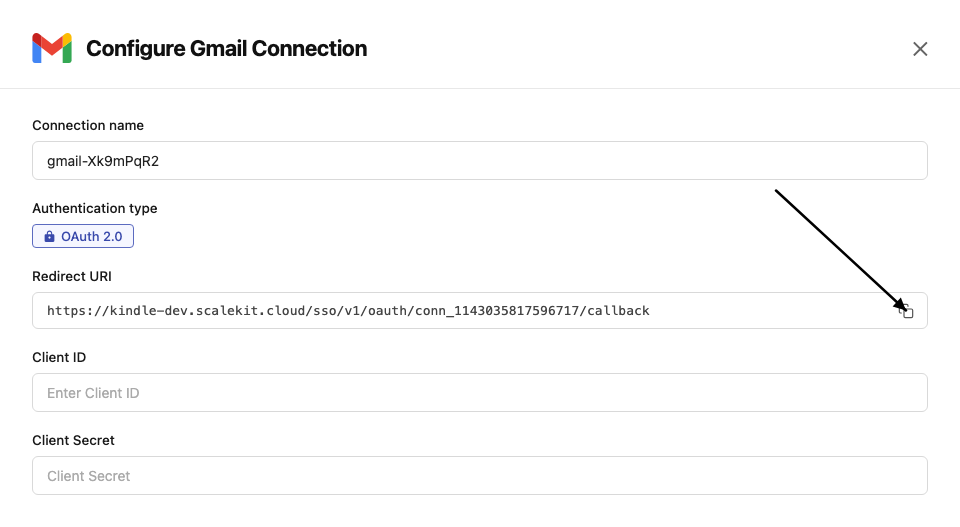
-
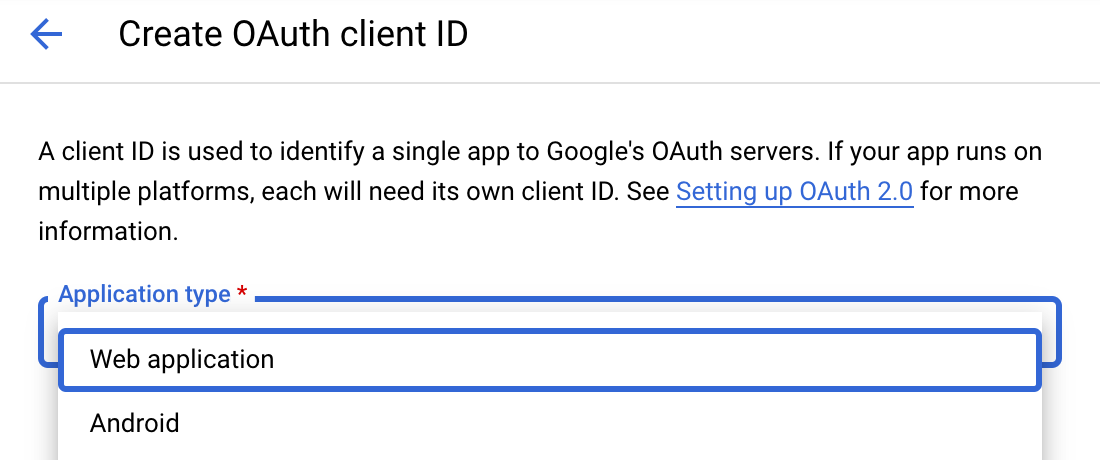
Navigate to Google Cloud Console → APIs & Services → Credentials. Click + Create Credentials, then OAuth client ID. Choose Web application as the application type.
-
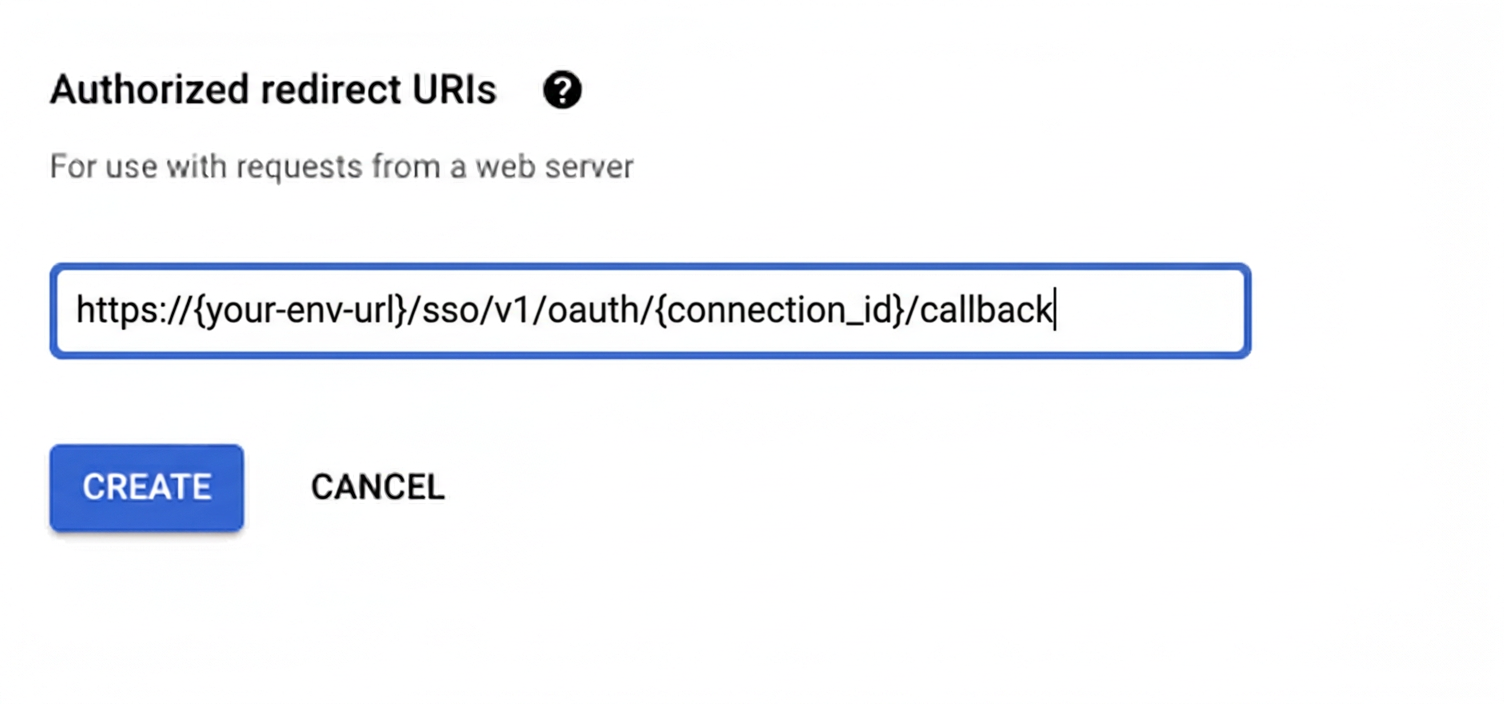
Under Authorized redirect URIs, click + Add URI, paste the redirect URI, and click Create.
-
-
Enable Gmail API
-
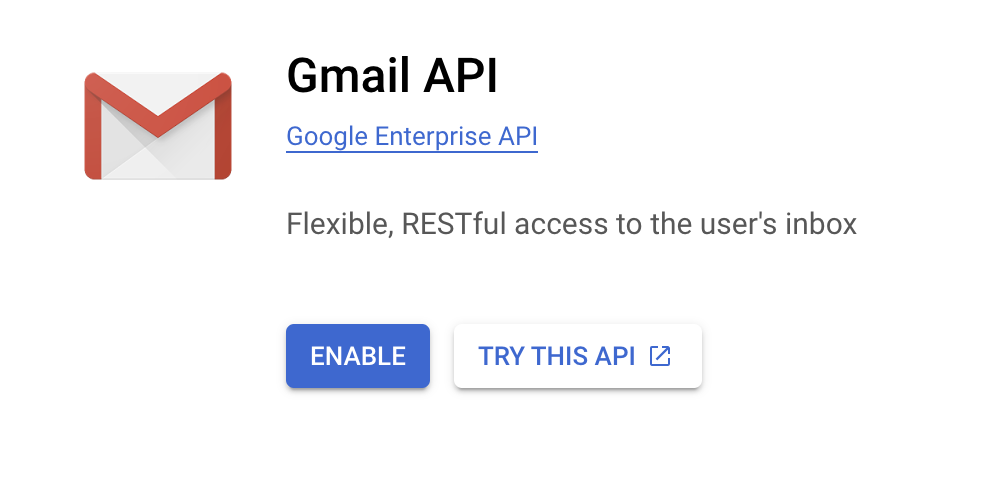
In Google Cloud Console, go to APIs & Services → Library. Search for “Gmail API” and click Enable.
-
-
Get client credentials
Google provides your Client ID and Client Secret after you create the OAuth client ID in step 1.
-
Add credentials in Scalekit
-
In Scalekit dashboard, go to AgentKit > Connections and open the connection you created.
-
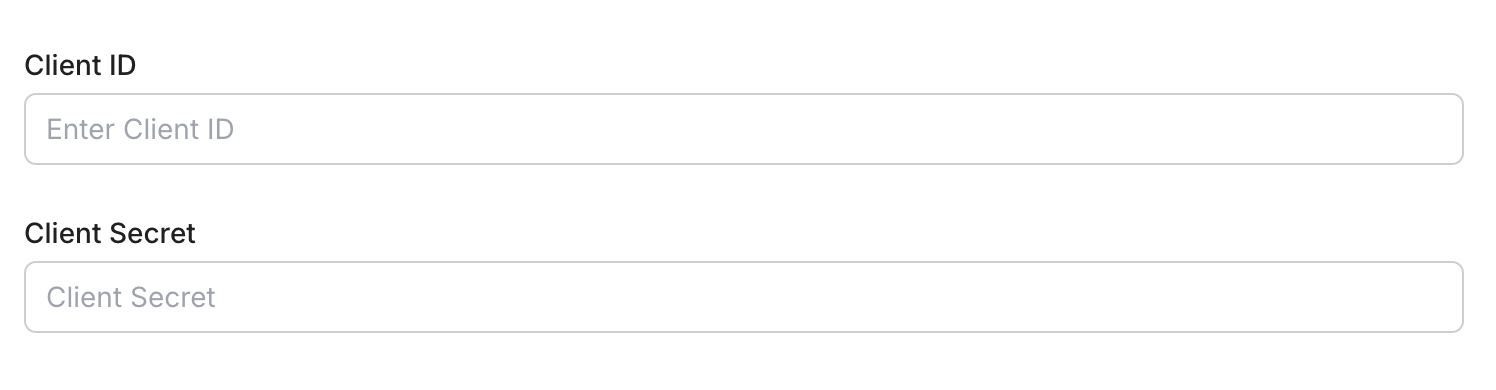
Enter your credentials:
- Client ID (from above)
- Client Secret (from above)
- Permissions (scopes beginning with
gmail— see Google API Scopes reference)
-
Click Save.
-
-
-
Authorize and make your first call
Section titled “Authorize and make your first call”quickstart.ts import { ScalekitClient } from '@scalekit-sdk/node'import 'dotenv/config'const scalekit = new ScalekitClient(process.env.SCALEKIT_ENV_URL,process.env.SCALEKIT_CLIENT_ID,process.env.SCALEKIT_CLIENT_SECRET,)const actions = scalekit.actionsconst connector = 'gmail'const identifier = 'user_123'// Generate an authorization link for the userconst { link } = await actions.getAuthorizationLink({ connectionName: connector, identifier })console.log('Authorize Gmail:', link)process.stdout.write('Press Enter after authorizing...')await new Promise(r => process.stdin.once('data', r))// Make your first callconst result = await actions.executeTool({connector,identifier,toolName: 'gmail_fetch_mails',toolInput: {},})console.log(result)quickstart.py import osfrom scalekit.client import ScalekitClientfrom dotenv import load_dotenvload_dotenv()scalekit_client = ScalekitClient(env_url=os.getenv("SCALEKIT_ENV_URL"),client_id=os.getenv("SCALEKIT_CLIENT_ID"),client_secret=os.getenv("SCALEKIT_CLIENT_SECRET"),)actions = scalekit_client.actionsconnection_name = "gmail"identifier = "user_123"# Generate an authorization link for the userlink_response = actions.get_authorization_link(connection_name=connection_name,identifier=identifier,)print("Authorize Gmail:", link_response.link)input("Press Enter after authorizing...")# Make your first callresult = actions.execute_tool(tool_input={},tool_name="gmail_fetch_mails",connection_name=connection_name,identifier=identifier,)print(result)
What you can do
Section titled “What you can do”Connect this agent connector to let your agent:
- Read emails — fetch messages, threads, and attachments from any label or inbox
- Send and reply — compose new emails and reply to existing threads on behalf of your users
- Search messages — query Gmail with full search syntax to find emails by sender, subject, or content
- Manage labels — apply, remove, and list labels to organize messages
- Access contacts — look up contacts and people from the user’s address book
Common workflows
Section titled “Common workflows”Use Gmail response fields as returned
Response fields from Gmail tools use camelCase, such as threadId, messageId, and internalDate. Tool input parameters use the snake_case names shown in the Tool list, such as thread_id and message_id. Extract values with camelCase, then pass them with snake_case.
const fetchResponse = await actions.executeTool({ connector: 'gmail', identifier: 'user_123', toolName: 'gmail_fetch_mails', toolInput: { query: 'is:unread', max_results: 5, },});
const messages = Array.isArray(fetchResponse.data?.messages) ? fetchResponse.data.messages : [];const threadId = typeof messages[0]?.threadId === 'string' ? messages[0].threadId : '';
if (threadId) { const threadResponse = await actions.executeTool({ connector: 'gmail', identifier: 'user_123', toolName: 'gmail_get_thread_by_id', toolInput: { thread_id: threadId, }, }); console.log(threadResponse.data);}fetch_response = actions.execute_tool( connection_name='gmail', identifier='user_123', tool_name="gmail_fetch_mails", tool_input={ "query": "is:unread", "max_results": 5, },)
data = fetch_response.data or {}messages = data.get("messages", [])thread_id = messages[0].get("threadId", "") if messages else ""
if thread_id: thread_response = actions.execute_tool( connection_name='gmail', identifier='user_123', tool_name="gmail_get_thread_by_id", tool_input={ "thread_id": thread_id, }, ) print(thread_response.data)Proxy API call
const result = await actions.request({ connectionName: 'gmail', identifier: 'user_123', path: '/gmail/v1/users/me/profile', method: 'GET',});console.log(result);result = actions.request( connection_name='gmail', identifier='user_123', path="/gmail/v1/users/me/profile", method="GET",)print(result)Google OAuth consent screen verification
Before you use your own Google OAuth credentials in production, understand what end users see on Google’s consent screen when they authorize a connected account.
| Audience type | Consent screen behavior | When to use |
|---|---|---|
| Internal | Shows your App Name and logo from Branding settings | Only users in your Google Workspace or Cloud Identity organization can authorize the connector |
| External | Shows {env_name}.scalekit.dev until Google verifies your app | Any user with a Google account can authorize the connector |
Why External is required for most AgentKit connectors:
- Internal restricts authorization to users in your Google Workspace or Cloud Identity organization. Users with
@gmail.comor other Google accounts outside your organization cannot complete OAuth. - External is required when end users outside your organization authorize tool access through connected accounts.
- Organization-managed OAuth clients follow the same rules as personal or developer OAuth clients. Switching to an org-owned client does not bypass Google verification.
- Until Google completes verification of your External app, users see
scalekit.devon the consent screen. After verification, your App Name and logo appear.
During development:
- Add Test users under APIs & Services → OAuth consent screen while publishing status is Testing.
- On unverified apps, users can click Advanced → Go to app (unsafe) to proceed during testing.
- Google Workspace admins may need to allowlist your OAuth client.
For Google’s verification requirements and timeline, refer to Google’s OAuth consent screen verification guide.
Tool list
Section titled “Tool list”Use the exact tool names from the Tool list below when you call execute_tool. If you’re not sure which name to use, list the tools available for the current user first.
gmail_batch_delete_messages#Permanently delete up to 1000 Gmail messages in a single batch request. This bypasses Trash entirely — the messages are immediately and permanently removed and CANNOT be recovered. Use gmail_trash_message or gmail_batch_modify_messages (with TRASH label) instead if the deletion should be reversible. Uses OAuth credentials.3 params
Permanently delete up to 1000 Gmail messages in a single batch request. This bypasses Trash entirely — the messages are immediately and permanently removed and CANNOT be recovered. Use gmail_trash_message or gmail_batch_modify_messages (with TRASH label) instead if the deletion should be reversible. Uses OAuth credentials.
message_idsarrayrequiredList of Gmail message IDs to permanently delete, up to 1000 per request. Obtain these from a list or search messages operation. Example: ["17a1b2c3d4e5f6g7", "17a1b2c3d4e5f6g8"]. WARNING: this permanently deletes the messages; they cannot be recovered.schema_versionstringoptionalOptional schema version to use for tool executiontool_versionstringoptionalOptional tool version to use for executiongmail_batch_modify_messages#Add or remove labels on up to 1000 Gmail messages in a single batch request. Use label IDs such as 'INBOX', 'UNREAD', 'STARRED', 'IMPORTANT', 'TRASH', 'SPAM', or custom label IDs. At least one of add_label_ids or remove_label_ids should be provided. Uses OAuth credentials.5 params
Add or remove labels on up to 1000 Gmail messages in a single batch request. Use label IDs such as 'INBOX', 'UNREAD', 'STARRED', 'IMPORTANT', 'TRASH', 'SPAM', or custom label IDs. At least one of add_label_ids or remove_label_ids should be provided. Uses OAuth credentials.
message_idsarrayrequiredList of Gmail message IDs to modify labels on, up to 1000 per request. Obtain these from a list or search messages operation. Example: ["17a1b2c3d4e5f6g7", "17a1b2c3d4e5f6g8"].add_label_idsarrayoptionalList of label IDs to add to each message. Use system labels such as 'INBOX', 'UNREAD', 'STARRED', 'IMPORTANT', or custom label IDs retrieved from the Labels API. Example: ["STARRED", "INBOX"].remove_label_idsarrayoptionalList of label IDs to remove from each message. Use system labels such as 'UNREAD', 'STARRED', 'INBOX', or custom label IDs. Example: ["UNREAD"].schema_versionstringoptionalOptional schema version to use for tool executiontool_versionstringoptionalOptional tool version to use for executiongmail_create_draft#Create a new draft email in Gmail for the authenticated user. Constructs a MIME message and saves it as a draft. Supports plain text and HTML content types, CC, BCC, and threading. Uses OAuth credentials.9 params
Create a new draft email in Gmail for the authenticated user. Constructs a MIME message and saves it as a draft. Supports plain text and HTML content types, CC, BCC, and threading. Uses OAuth credentials.
bodystringrequiredThe body content of the draft email. Provide plain text or HTML depending on the content_type field. Example: 'Hello, this is my draft message.'subjectstringrequiredThe subject line of the draft email. Example: 'Meeting Follow-up'.tostringrequiredThe recipient email address(es) for the draft. Provide a single address or comma-separated list. Example: 'recipient@example.com' or 'a@example.com,b@example.com'.bccstringoptionalBCC recipients for the draft email. Provide a comma-separated list of email addresses, e.g., bcc1@example.com,bcc2@example.com. Optional.ccstringoptionalCC recipients for the draft email. Provide a comma-separated list of email addresses, e.g., cc1@example.com,cc2@example.com. Optional.content_typestringoptionalThe MIME content type for the email body. Use 'text/plain' for plain text or 'text/html' for HTML content. Defaults to 'text/plain'.schema_versionstringoptionalOptional schema version to use for tool executionthread_idstringoptionalThe Gmail thread ID to associate this draft with an existing conversation. If provided, the draft will be part of that thread. Example: '17a1b2c3d4e5f6g7'.tool_versionstringoptionalOptional tool version to use for executiongmail_create_filter#Create a new email filter for the authenticated Gmail account. Specify criteria (sender, recipient, subject, query, or attachment) and actions (apply labels, forward, archive, star, trash, mark as read, etc.). At least one criteria field should be provided. Uses OAuth credentials.17 params
Create a new email filter for the authenticated Gmail account. Specify criteria (sender, recipient, subject, query, or attachment) and actions (apply labels, forward, archive, star, trash, mark as read, etc.). At least one criteria field should be provided. Uses OAuth credentials.
add_label_idsarrayoptionalList of Gmail label IDs to apply to matching messages (e.g., ['Label_123', 'STARRED']). Use the List Labels tool to find valid label IDs.forwardstringoptionalEmail address to forward matching messages to. The address must already be configured as a forwarding address in the Gmail account.fromstringoptionalSender email address or domain to match in the filter criteria (e.g., 'alerts@github.com' or '@newsletter.com').has_attachmentbooleanoptionalIf true, only match messages that have at least one attachment.querystringoptionalGmail search query string to match messages using Gmail's search syntax (e.g., 'larger:10M', 'is:important').remove_label_idsarrayoptionalList of Gmail label IDs to remove from matching messages (e.g., ['INBOX'] to archive, ['UNREAD'] to mark as read).schema_versionstringoptionalOptional schema version to use for tool executionshould_always_mark_importantbooleanoptionalIf true, always mark matching messages as important regardless of Gmail's automatic importance detection.should_archivebooleanoptionalIf true, skip the inbox for matching messages (equivalent to adding the 'Archive' action).should_mark_readbooleanoptionalIf true, automatically mark matching messages as read.should_never_mark_importantbooleanoptionalIf true, never mark matching messages as important, overriding Gmail's automatic importance detection.should_never_spambooleanoptionalIf true, never send matching messages to the Spam folder.should_starbooleanoptionalIf true, automatically star matching messages.should_trashbooleanoptionalIf true, automatically move matching messages to the Trash.subjectstringoptionalSubject line text to match in the filter criteria (e.g., '[GitHub]' or 'Invoice').tostringoptionalRecipient email address to match in the filter criteria (e.g., 'team@example.com').tool_versionstringoptionalOptional tool version to use for executiongmail_create_label#Create a new user label in the authenticated Gmail account. Labels can be applied to messages for organization and are visible in the Gmail label list and message list based on the visibility settings. Uses OAuth credentials.5 params
Create a new user label in the authenticated Gmail account. Labels can be applied to messages for organization and are visible in the Gmail label list and message list based on the visibility settings. Uses OAuth credentials.
namestringrequiredThe display name of the new label. Must be unique within the account. Example: 'Follow Up'.label_list_visibilitystringoptionalControls whether the label is shown in the Gmail label list. Use 'labelShow' to always show, 'labelShowIfUnread' to show only when it has unread messages, or 'labelHide' to hide it. Defaults to 'labelShow'.message_list_visibilitystringoptionalControls whether the label is shown in the message list. Use 'show' to display it or 'hide' to conceal it. Defaults to 'show'.schema_versionstringoptionalOptional schema version to use for tool executiontool_versionstringoptionalOptional tool version to use for executiongmail_delete_draft#Permanently delete a Gmail draft. This is a permanent removal and does not send the draft or move it to Trash for recovery. Uses OAuth credentials.3 params
Permanently delete a Gmail draft. This is a permanent removal and does not send the draft or move it to Trash for recovery. Uses OAuth credentials.
draft_idstringrequiredThe Gmail draft ID to permanently delete. Obtain this from a list drafts operation. Example: 'r-1234567890123456789'.schema_versionstringoptionalOptional schema version to use for tool executiontool_versionstringoptionalOptional tool version to use for executiongmail_delete_filter#Permanently delete an email filter from the authenticated Gmail account. This does not affect messages already processed by the filter. Use the List Email Filters tool to find the filter ID. Uses OAuth credentials.3 params
Permanently delete an email filter from the authenticated Gmail account. This does not affect messages already processed by the filter. Use the List Email Filters tool to find the filter ID. Uses OAuth credentials.
filter_idstringrequiredThe Gmail filter ID to permanently delete. Obtain this from the List Email Filters tool. Example: 'ANe1BmiXxxxxxx'.schema_versionstringoptionalOptional schema version to use for tool executiontool_versionstringoptionalOptional tool version to use for executiongmail_delete_label#Permanently delete a user label from the authenticated Gmail account. This removes the label from all messages it was applied to and cannot be undone. Use the List Labels tool to find the label ID. Uses OAuth credentials.3 params
Permanently delete a user label from the authenticated Gmail account. This removes the label from all messages it was applied to and cannot be undone. Use the List Labels tool to find the label ID. Uses OAuth credentials.
label_idstringrequiredThe Gmail label ID to permanently delete. Use a custom label ID obtained from the List Labels tool. Example: 'Label_123'.schema_versionstringoptionalOptional schema version to use for tool executiontool_versionstringoptionalOptional tool version to use for executiongmail_delete_message#Permanently delete a single Gmail message. This bypasses Trash entirely — the message is immediately and permanently removed and CANNOT be recovered. Use gmail_trash_message instead if the deletion should be reversible. Uses OAuth credentials.3 params
Permanently delete a single Gmail message. This bypasses Trash entirely — the message is immediately and permanently removed and CANNOT be recovered. Use gmail_trash_message instead if the deletion should be reversible. Uses OAuth credentials.
message_idstringrequiredThe Gmail message ID to permanently delete. Obtain this from a list or search messages operation. Example: '17a1b2c3d4e5f6g7'. WARNING: this permanently deletes the message; it cannot be recovered.schema_versionstringoptionalOptional schema version to use for tool executiontool_versionstringoptionalOptional tool version to use for executiongmail_fetch_mails#Fetch emails from a connected Gmail account using search filters. Requires a valid Gmail OAuth2 connection.8 params
Fetch emails from a connected Gmail account using search filters. Requires a valid Gmail OAuth2 connection.
formatstringoptionalFormat of the returned message.include_spam_trashbooleanoptionalWhether to fetch emails from spam and trash folderslabel_idsarrayoptionalGmail label IDs to filter messagesmax_resultsintegeroptionalMaximum number of emails to fetchpage_tokenstringoptionalPage token for paginationquerystringoptionalSearch query string using Gmail's search syntax (e.g., 'is:unread from:user@example.com')schema_versionstringoptionalOptional schema version to use for tool executiontool_versionstringoptionalOptional tool version to use for executiongmail_get_attachment_by_id#Retrieve a specific attachment from a Gmail message using the message ID and attachment ID.5 params
Retrieve a specific attachment from a Gmail message using the message ID and attachment ID.
attachment_idstringrequiredUnique Gmail attachment IDmessage_idstringrequiredUnique Gmail message ID that contains the attachmentfile_namestringoptionalPreferred filename to use when saving/returning the attachmentschema_versionstringoptionalOptional schema version to use for tool executiontool_versionstringoptionalOptional tool version to use for executiongmail_get_contacts#Fetch a list of contacts from the connected Gmail account. Supports pagination and field filtering.5 params
Fetch a list of contacts from the connected Gmail account. Supports pagination and field filtering.
max_resultsintegeroptionalMaximum number of contacts to fetchpage_tokenstringoptionalToken to retrieve the next page of resultsperson_fieldsarrayoptionalFields to include for each personschema_versionstringoptionalOptional schema version to use for tool executiontool_versionstringoptionalOptional tool version to use for executiongmail_get_draft#Retrieve a specific Gmail draft by draft ID. Optionally control the format of the returned message content. Uses OAuth credentials.4 params
Retrieve a specific Gmail draft by draft ID. Optionally control the format of the returned message content. Uses OAuth credentials.
draft_idstringrequiredThe Gmail draft ID to retrieve. Obtain this from a list drafts operation. Example: 'r-1234567890123456789'.formatstringoptionalThe format of the returned draft message. 'full' returns the parsed email with headers and body. 'minimal' returns only IDs and labels. 'raw' returns the full RFC 2822 message as a base64url string. 'metadata' returns headers only.schema_versionstringoptionalOptional schema version to use for tool executiontool_versionstringoptionalOptional tool version to use for executiongmail_get_filter#Get details for a specific email filter in the authenticated Gmail account, including its criteria and actions. Use the List Email Filters tool to find valid filter IDs. Uses OAuth credentials.3 params
Get details for a specific email filter in the authenticated Gmail account, including its criteria and actions. Use the List Email Filters tool to find valid filter IDs. Uses OAuth credentials.
filter_idstringrequiredThe Gmail filter ID to retrieve. Obtain this from the List Email Filters tool. Example: 'ANe1BmiXxxxxxx'.schema_versionstringoptionalOptional schema version to use for tool executiontool_versionstringoptionalOptional tool version to use for executiongmail_get_label#Get details for a specific Gmail label, including its name, type, and visibility settings. Use the List Labels tool to find valid label IDs. Uses OAuth credentials.3 params
Get details for a specific Gmail label, including its name, type, and visibility settings. Use the List Labels tool to find valid label IDs. Uses OAuth credentials.
label_idstringrequiredThe Gmail label ID to retrieve. Use system labels such as 'INBOX', 'STARRED', 'IMPORTANT', or a custom label ID obtained from the List Labels tool. Example: 'Label_123'.schema_versionstringoptionalOptional schema version to use for tool executiontool_versionstringoptionalOptional tool version to use for executiongmail_get_message_by_id#Retrieve a specific Gmail message using its message ID. Optionally control the format of the returned data.4 params
Retrieve a specific Gmail message using its message ID. Optionally control the format of the returned data.
message_idstringrequiredUnique Gmail message IDformatstringoptionalFormat of the returned message.schema_versionstringoptionalOptional schema version to use for tool executiontool_versionstringoptionalOptional tool version to use for executiongmail_get_profile#Get the Gmail profile for the authenticated user, including their email address, total message count, thread count, and current history ID. Uses OAuth credentials.2 params
Get the Gmail profile for the authenticated user, including their email address, total message count, thread count, and current history ID. Uses OAuth credentials.
schema_versionstringoptionalOptional schema version to use for tool executiontool_versionstringoptionalOptional tool version to use for executiongmail_get_send_as#Get send-as alias settings including email signature for the authenticated Gmail account. Use the user's own email address to retrieve the default send-as settings and signature. Uses OAuth credentials.3 params
Get send-as alias settings including email signature for the authenticated Gmail account. Use the user's own email address to retrieve the default send-as settings and signature. Uses OAuth credentials.
send_as_emailstringrequiredThe send-as alias email address to retrieve settings for. Use the user's own email address (e.g., 'user@example.com') to get their default signature and send-as settings.schema_versionstringoptionalOptional schema version to use for tool executiontool_versionstringoptionalOptional tool version to use for executiongmail_get_thread_by_id#Retrieve a specific Gmail thread by thread ID. Optionally control message format and metadata headers. Requires a valid Gmail OAuth2 connection with read access.5 params
Retrieve a specific Gmail thread by thread ID. Optionally control message format and metadata headers. Requires a valid Gmail OAuth2 connection with read access.
thread_idstringrequiredUnique Gmail thread IDformatstringoptionalFormat of messages in the returned thread.metadata_headersarrayoptionalSpecific email headers to include when format is metadataschema_versionstringoptionalOptional schema version to use for tool executiontool_versionstringoptionalOptional tool version to use for executiongmail_get_vacation_settings#Get the vacation auto-reply settings for the authenticated Gmail account. Uses OAuth credentials.2 params
Get the vacation auto-reply settings for the authenticated Gmail account. Uses OAuth credentials.
schema_versionstringoptionalOptional schema version to use for tool executiontool_versionstringoptionalOptional tool version to use for executiongmail_list_drafts#List draft emails from a connected Gmail account. Requires a valid Gmail OAuth2 connection.4 params
List draft emails from a connected Gmail account. Requires a valid Gmail OAuth2 connection.
max_resultsintegeroptionalMaximum number of drafts to fetchpage_tokenstringoptionalPage token for paginationschema_versionstringoptionalOptional schema version to use for tool executiontool_versionstringoptionalOptional tool version to use for executiongmail_list_filters#List all email filters for the authenticated Gmail account. Returns filter criteria and actions such as label assignment, forwarding, and archiving rules. Uses OAuth credentials.2 params
List all email filters for the authenticated Gmail account. Returns filter criteria and actions such as label assignment, forwarding, and archiving rules. Uses OAuth credentials.
schema_versionstringoptionalOptional schema version to use for tool executiontool_versionstringoptionalOptional tool version to use for executiongmail_list_labels#List all labels (system and user-created) in the authenticated Gmail account. Returns label IDs, names, and visibility settings that can be used with message and filter operations. Uses OAuth credentials.2 params
List all labels (system and user-created) in the authenticated Gmail account. Returns label IDs, names, and visibility settings that can be used with message and filter operations. Uses OAuth credentials.
schema_versionstringoptionalOptional schema version to use for tool executiontool_versionstringoptionalOptional tool version to use for executiongmail_list_threads#List threads in a connected Gmail account using optional search and label filters. Requires a valid Gmail OAuth2 connection with read access.7 params
List threads in a connected Gmail account using optional search and label filters. Requires a valid Gmail OAuth2 connection with read access.
include_spam_trashbooleanoptionalWhether to include threads from Spam and Trashlabel_idsarrayoptionalGmail label IDs to filter threads (threads must match all labels)max_resultsintegeroptionalMaximum number of threads to returnpage_tokenstringoptionalPage token for paginationquerystringoptionalSearch query string using Gmail search syntax (for example, 'is:unread from:user@example.com')schema_versionstringoptionalOptional schema version to use for tool executiontool_versionstringoptionalOptional tool version to use for executiongmail_modify_message_labels#Add or remove labels on a Gmail message. Use label IDs such as 'INBOX', 'UNREAD', 'STARRED', 'IMPORTANT', 'TRASH', 'SPAM', or custom label IDs. At least one of add_label_ids or remove_label_ids should be provided. Uses OAuth credentials.5 params
Add or remove labels on a Gmail message. Use label IDs such as 'INBOX', 'UNREAD', 'STARRED', 'IMPORTANT', 'TRASH', 'SPAM', or custom label IDs. At least one of add_label_ids or remove_label_ids should be provided. Uses OAuth credentials.
message_idstringrequiredThe Gmail message ID whose labels will be modified. Obtain this from a list or search messages operation. Example: '17a1b2c3d4e5f6g7'.add_label_idsarrayoptionalList of label IDs to add to the message. Use system labels such as 'INBOX', 'UNREAD', 'STARRED', 'IMPORTANT', or custom label IDs retrieved from the Labels API. Example: ["STARRED", "INBOX"].remove_label_idsarrayoptionalList of label IDs to remove from the message. Use system labels such as 'UNREAD', 'STARRED', 'INBOX', or custom label IDs. Example: ["UNREAD"].schema_versionstringoptionalOptional schema version to use for tool executiontool_versionstringoptionalOptional tool version to use for executiongmail_reply_to_thread#Send a reply within an existing Gmail thread. Constructs a MIME message, optionally sets In-Reply-To and References headers to properly thread the reply against the original message, and sends it as part of the given thread. Uses OAuth credentials.10 params
Send a reply within an existing Gmail thread. Constructs a MIME message, optionally sets In-Reply-To and References headers to properly thread the reply against the original message, and sends it as part of the given thread. Uses OAuth credentials.
bodystringrequiredThe body content of the reply. Provide plain text or HTML depending on the content_type field. Example: 'Thanks for the update, sounds good.'thread_idstringrequiredThe Gmail thread ID to reply within. Obtain this from a list or search messages/threads operation. Example: '17a1b2c3d4e5f6g7'.tostringrequiredThe recipient email address(es) for the reply. Provide a single address or comma-separated list. Example: 'recipient@example.com' or 'a@example.com,b@example.com'.bccstringoptionalBCC recipients for the reply. Provide a comma-separated list of email addresses, e.g., bcc1@example.com,bcc2@example.com. Optional.ccstringoptionalCC recipients for the reply. Provide a comma-separated list of email addresses, e.g., cc1@example.com,cc2@example.com. Optional.content_typestringoptionalThe MIME content type for the reply body. Use 'text/plain' for plain text or 'text/html' for HTML content. Defaults to 'text/plain'.in_reply_to_message_idstringoptionalThe RFC822 Message-ID header value of the message being replied to. Used to set the In-Reply-To and References headers so mail clients thread the reply correctly. Example: '<abc123@mail.gmail.com>'.schema_versionstringoptionalOptional schema version to use for tool executionsubjectstringoptionalThe subject line of the reply. If omitted, defaults to 'Re:'. It's recommended to pass the original subject prefixed with 'Re: ', e.g., 'Re: Meeting Follow-up'.tool_versionstringoptionalOptional tool version to use for executiongmail_search_people#Search people or contacts in the connected Google account using a query. Requires a valid Google OAuth2 connection with People API scopes.6 params
Search people or contacts in the connected Google account using a query. Requires a valid Google OAuth2 connection with People API scopes.
querystringrequiredText query to search people (e.g., name, email address).other_contactsbooleanoptionalWhether to include people not in the user's contacts (from 'Other Contacts').page_sizeintegeroptionalMaximum number of people to return.person_fieldsarrayoptionalFields to retrieve for each person.schema_versionstringoptionalOptional schema version to use for tool executiontool_versionstringoptionalOptional tool version to use for executiongmail_send_draft#Send an existing draft email from the authenticated Gmail account. The draft is removed from Drafts and delivered as a sent message. Uses OAuth credentials.3 params
Send an existing draft email from the authenticated Gmail account. The draft is removed from Drafts and delivered as a sent message. Uses OAuth credentials.
draft_idstringrequiredThe Gmail draft ID to send. Obtain this from a list drafts or create draft operation. Example: 'r-1234567890123456789'.schema_versionstringoptionalOptional schema version to use for tool executiontool_versionstringoptionalOptional tool version to use for executiongmail_send_message#Send an email message immediately from the authenticated Gmail account. Constructs a MIME message and sends it via the Gmail API. Supports plain text and HTML content types, CC, BCC, and attaching the message to an existing thread. Uses OAuth credentials.9 params
Send an email message immediately from the authenticated Gmail account. Constructs a MIME message and sends it via the Gmail API. Supports plain text and HTML content types, CC, BCC, and attaching the message to an existing thread. Uses OAuth credentials.
bodystringrequiredThe body content of the email. Provide plain text or HTML depending on the content_type field. Example: 'Hello, this is my message.'subjectstringrequiredThe subject line of the email. Example: 'Meeting Follow-up'.tostringrequiredThe recipient email address(es) for the message. Provide a single address or comma-separated list. Example: 'recipient@example.com' or 'a@example.com,b@example.com'.bccstringoptionalBCC recipients for the email. Provide a comma-separated list of email addresses, e.g., bcc1@example.com,bcc2@example.com. Optional.ccstringoptionalCC recipients for the email. Provide a comma-separated list of email addresses, e.g., cc1@example.com,cc2@example.com. Optional.content_typestringoptionalThe MIME content type for the email body. Use 'text/plain' for plain text or 'text/html' for HTML content. Defaults to 'text/plain'.schema_versionstringoptionalOptional schema version to use for tool executionthread_idstringoptionalThe Gmail thread ID to associate this sent message with an existing conversation. If provided, the message is added to that thread. Example: '17a1b2c3d4e5f6g7'.tool_versionstringoptionalOptional tool version to use for executiongmail_stop_mailbox_watch#Stop receiving push notifications for the current Gmail mailbox by canceling any active watch registered via gmail_watch_mailbox. This operation is idempotent — calling it when no watch is active is a no-op. Uses OAuth credentials.2 params
Stop receiving push notifications for the current Gmail mailbox by canceling any active watch registered via gmail_watch_mailbox. This operation is idempotent — calling it when no watch is active is a no-op. Uses OAuth credentials.
schema_versionstringoptionalOptional schema version to use for tool executiontool_versionstringoptionalOptional tool version to use for executiongmail_trash_message#Move a Gmail message to the Trash. The message is not permanently deleted and can be recovered from Trash within 30 days. This operation is idempotent — trashing an already-trashed message is a no-op. Uses OAuth credentials.3 params
Move a Gmail message to the Trash. The message is not permanently deleted and can be recovered from Trash within 30 days. This operation is idempotent — trashing an already-trashed message is a no-op. Uses OAuth credentials.
message_idstringrequiredThe Gmail message ID to move to Trash. Obtain this from a list or search messages operation. Example: '17a1b2c3d4e5f6g7'.schema_versionstringoptionalOptional schema version to use for tool executiontool_versionstringoptionalOptional tool version to use for executiongmail_untrash_message#Remove a Gmail message from Trash and restore it to its previous location. This operation is idempotent — untrashing a message that is not in Trash is a no-op. Uses OAuth credentials.3 params
Remove a Gmail message from Trash and restore it to its previous location. This operation is idempotent — untrashing a message that is not in Trash is a no-op. Uses OAuth credentials.
message_idstringrequiredThe Gmail message ID to remove from Trash. Obtain this from a list or search messages operation. Example: '17a1b2c3d4e5f6g7'.schema_versionstringoptionalOptional schema version to use for tool executiontool_versionstringoptionalOptional tool version to use for executiongmail_update_draft#Replace the content of an existing Gmail draft. Constructs a new MIME message and overwrites the draft identified by draft_id. Supports plain text and HTML content types, CC, BCC, and threading. Uses OAuth credentials.10 params
Replace the content of an existing Gmail draft. Constructs a new MIME message and overwrites the draft identified by draft_id. Supports plain text and HTML content types, CC, BCC, and threading. Uses OAuth credentials.
bodystringrequiredThe body content of the draft email. Provide plain text or HTML depending on the content_type field. Example: 'Hello, this is my updated draft message.'draft_idstringrequiredThe Gmail draft ID to update. Obtain this from a list drafts or create draft operation. Example: 'r-1234567890123456789'.subjectstringrequiredThe subject line of the draft email. Example: 'Meeting Follow-up (updated)'.tostringrequiredThe recipient email address(es) for the draft. Provide a single address or comma-separated list. Example: 'recipient@example.com' or 'a@example.com,b@example.com'.bccstringoptionalBCC recipients for the draft email. Provide a comma-separated list of email addresses, e.g., bcc1@example.com,bcc2@example.com. Optional.ccstringoptionalCC recipients for the draft email. Provide a comma-separated list of email addresses, e.g., cc1@example.com,cc2@example.com. Optional.content_typestringoptionalThe MIME content type for the email body. Use 'text/plain' for plain text or 'text/html' for HTML content. Defaults to 'text/plain'.schema_versionstringoptionalOptional schema version to use for tool executionthread_idstringoptionalThe Gmail thread ID to associate this draft with an existing conversation. If provided, the draft will be part of that thread. Example: '17a1b2c3d4e5f6g7'.tool_versionstringoptionalOptional tool version to use for executiongmail_update_label#Update an existing user label in the authenticated Gmail account. Change the label name or its visibility in the label list and message list. Use the List Labels tool to find the label ID. Uses OAuth credentials.6 params
Update an existing user label in the authenticated Gmail account. Change the label name or its visibility in the label list and message list. Use the List Labels tool to find the label ID. Uses OAuth credentials.
label_idstringrequiredThe Gmail label ID to update. Use a custom label ID obtained from the List Labels tool. Example: 'Label_123'.label_list_visibilitystringoptionalControls whether the label is shown in the Gmail label list. Use 'labelShow' to always show, 'labelShowIfUnread' to show only when it has unread messages, or 'labelHide' to hide it.message_list_visibilitystringoptionalControls whether the label is shown in the message list. Use 'show' to display it or 'hide' to conceal it.namestringoptionalThe new display name for the label. Must be unique within the account. Example: 'Follow Up - Urgent'.schema_versionstringoptionalOptional schema version to use for tool executiontool_versionstringoptionalOptional tool version to use for executiongmail_update_send_as#Update send-as alias settings such as the email signature, display name, or reply-to address for the authenticated Gmail account. Use the user's own email address to update their default signature. Uses OAuth credentials.7 params
Update send-as alias settings such as the email signature, display name, or reply-to address for the authenticated Gmail account. Use the user's own email address to update their default signature. Uses OAuth credentials.
send_as_emailstringrequiredThe send-as alias email address to update. Use the user's own email address (e.g., 'user@example.com') to update their default signature and settings.display_namestringoptionalThe display name shown as the sender name for this alias (e.g., 'Jane Smith').is_defaultbooleanoptionalIf true, sets this send-as alias as the default address used when composing new messages.reply_to_addressstringoptionalAn optional email address that appears in the Reply-To header for messages sent from this alias (e.g., 'replies@example.com').schema_versionstringoptionalOptional schema version to use for tool executionsignaturestringoptionalHTML email signature to set for this alias. Supports full HTML markup (e.g., '<b>Jane Smith</b><br>Senior Engineer').tool_versionstringoptionalOptional tool version to use for executiongmail_update_vacation_settings#Update the vacation auto-reply settings for the authenticated Gmail account. Set enableAutoReply to true to activate out-of-office responses. Uses OAuth credentials.10 params
Update the vacation auto-reply settings for the authenticated Gmail account. Set enableAutoReply to true to activate out-of-office responses. Uses OAuth credentials.
enable_auto_replybooleanrequiredWhether to enable the vacation auto-reply. Set to true to turn on out-of-office responses, false to disable.end_timestringoptionalEnd time for the vacation auto-reply as epoch milliseconds in string format (e.g., '1754006400000'). After this time, auto-reply stops.response_body_htmlstringoptionalHTML body of the vacation auto-reply message. If both plain text and HTML are provided, HTML takes precedence for clients that support it.response_body_plain_textstringoptionalPlain text body of the vacation auto-reply message.response_subjectstringoptionalSubject line of the vacation auto-reply email (e.g., 'Out of Office: Back on Monday').restrict_to_contactsbooleanoptionalIf true, only contacts in the user's Google Contacts will receive the auto-reply. Default is false.restrict_to_domainbooleanoptionalIf true, only users in the same Google Workspace domain will receive the auto-reply. Default is false.schema_versionstringoptionalOptional schema version to use for tool executionstart_timestringoptionalStart time for the vacation auto-reply as epoch milliseconds in string format (e.g., '1753401600000'). Auto-reply activates from this time.tool_versionstringoptionalOptional tool version to use for executiongmail_watch_mailbox#Set up push notifications for changes to a Gmail mailbox by registering a Google Cloud Pub/Sub topic. Gmail publishes a notification to the topic whenever the mailbox's history changes. Each call replaces any existing watch and the watch expires after 7 days, so it must be renewed periodically. Uses OAuth credentials.5 params
Set up push notifications for changes to a Gmail mailbox by registering a Google Cloud Pub/Sub topic. Gmail publishes a notification to the topic whenever the mailbox's history changes. Each call replaces any existing watch and the watch expires after 7 days, so it must be renewed periodically. Uses OAuth credentials.
topic_namestringrequiredThe full Cloud Pub/Sub topic name to publish mailbox change notifications to. Must be in the format 'projects/{project}/topics/{topic}'. Example: 'projects/myproject/topics/mytopic'.label_filter_behaviorstringoptionalWhether label_ids should be used to INCLUDE (restrict notifications to only these labels) or EXCLUDE (notify on all labels except these) label changes. Only used when label_ids is provided. Defaults to INCLUDE.label_idsarrayoptionalList of label IDs to restrict notifications to (or exclude from, depending on label_filter_behavior). Example: ["INBOX"]. If omitted, all mailbox changes trigger notifications.schema_versionstringoptionalOptional schema version to use for tool executiontool_versionstringoptionalOptional tool version to use for execution