


Notion connector
OAuth 2.0Project ManagementFiles & DocumentsCollaborationConnect to Notion workspace. Create, edit pages, manage databases, and collaborate on content
Notion connector
-
Install the SDK
Section titled “Install the SDK”Terminal window npm install @scalekit-sdk/nodeTerminal window pip install scalekit -
Set your credentials
Section titled “Set your credentials”Add your Scalekit credentials to your
.envfile. Find values in app.scalekit.com > Developers > API Credentials..env SCALEKIT_ENVIRONMENT_URL=<your-environment-url>SCALEKIT_CLIENT_ID=<your-client-id>SCALEKIT_CLIENT_SECRET=<your-client-secret> -
Set up the connector
Section titled “Set up the connector”Register your Notion credentials with Scalekit so it handles the token lifecycle. You do this once per environment.
Dashboard setup steps
Register your Scalekit environment with the Notion connector so Scalekit handles the authentication flow and token lifecycle for you. The connection name you create will be used to identify and invoke the connection programmatically. Then complete the configuration in your application as follows:
-
Set up auth redirects
-
In Scalekit dashboard, go to AgentKit > Connections > Create Connection. Find Notion and click Create. Copy the redirect URI. It looks like
https://<SCALEKIT_ENVIRONMENT_URL>/sso/v1/oauth/<CONNECTION_ID>/callback.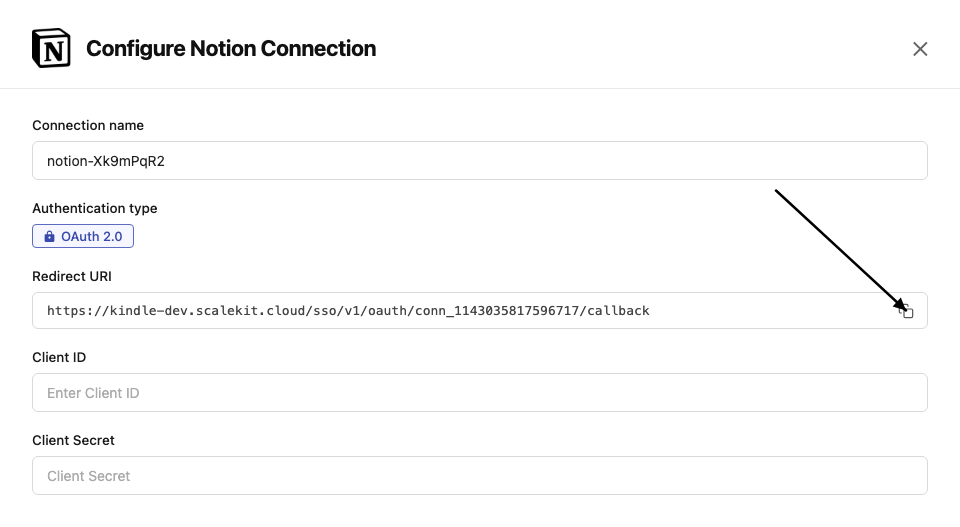
-
Go to Notion Integrations and click New integration.
-
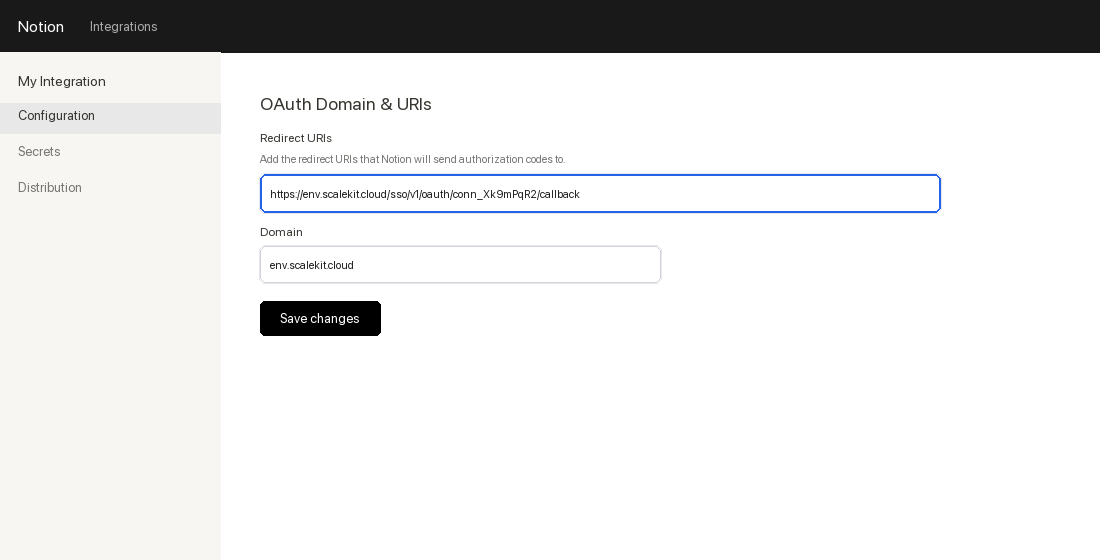
Fill in the integration name and select your workspace. In the OAuth Domain & URIs section, paste the redirect URI from Scalekit and click Submit.
-
-
Get client credentials
-
In your Notion integration settings, go to the Secrets tab.
-
Copy the OAuth client ID and OAuth client secret.
-
-
Add credentials in Scalekit
-
In Scalekit dashboard, go to AgentKit > Connections and open the connection you created.
-
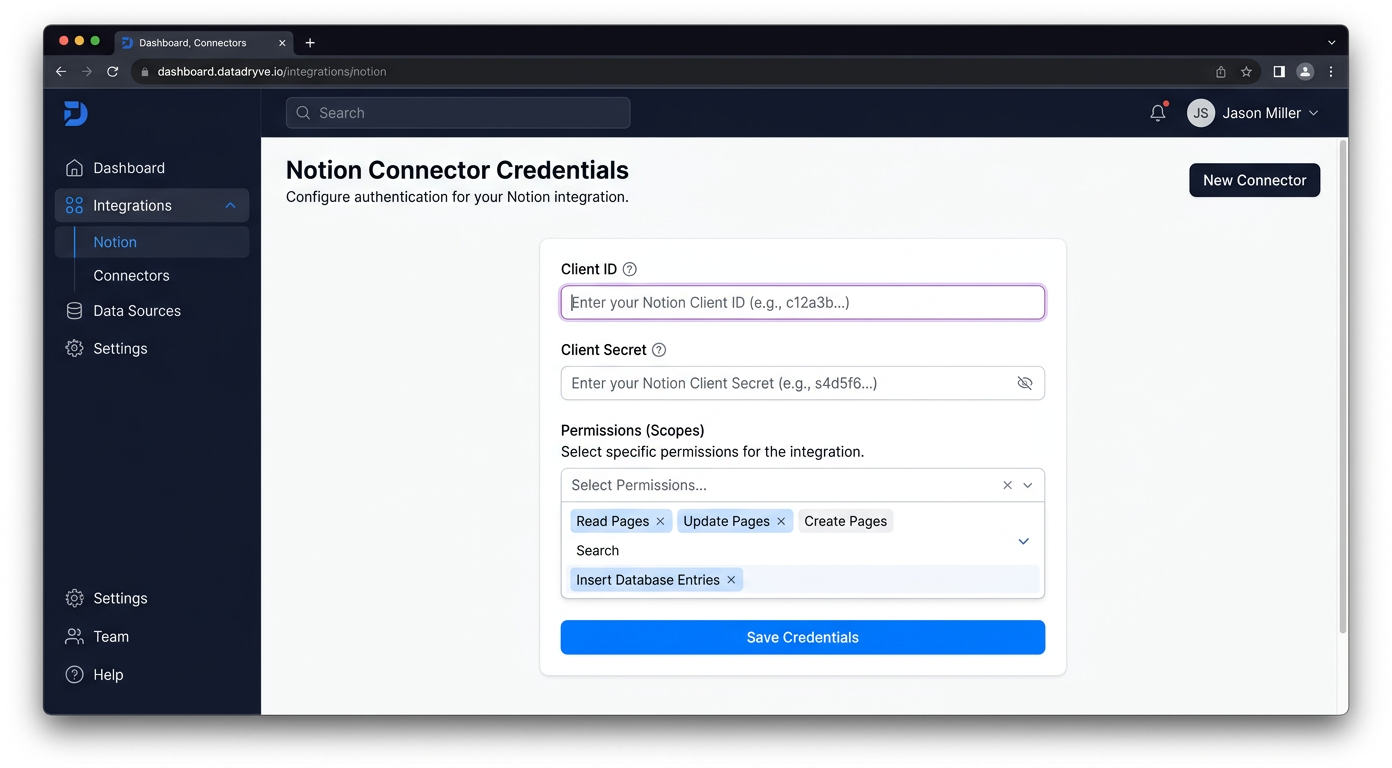
Enter your credentials:
- Client ID (OAuth client ID from above)
- Client Secret (OAuth client secret from above)
- Permissions (capabilities — see Notion capabilities reference)
-
Click Save.
-
-
-
Authorize and make your first call
Section titled “Authorize and make your first call”quickstart.ts import { ScalekitClient } from '@scalekit-sdk/node'import 'dotenv/config'const scalekit = new ScalekitClient(process.env.SCALEKIT_ENV_URL,process.env.SCALEKIT_CLIENT_ID,process.env.SCALEKIT_CLIENT_SECRET,)const actions = scalekit.actionsconst connector = 'notion'const identifier = 'user_123'// Generate an authorization link for the userconst { link } = await actions.getAuthorizationLink({ connectionName: connector, identifier })console.log('Authorize Notion:', link)process.stdout.write('Press Enter after authorizing...')await new Promise(r => process.stdin.once('data', r))// Make your first callconst result = await actions.executeTool({connector,identifier,toolName: 'notion_custom_emojis_list',toolInput: {},})console.log(result)quickstart.py import osfrom scalekit.client import ScalekitClientfrom dotenv import load_dotenvload_dotenv()scalekit_client = ScalekitClient(env_url=os.getenv("SCALEKIT_ENV_URL"),client_id=os.getenv("SCALEKIT_CLIENT_ID"),client_secret=os.getenv("SCALEKIT_CLIENT_SECRET"),)actions = scalekit_client.actionsconnection_name = "notion"identifier = "user_123"# Generate an authorization link for the userlink_response = actions.get_authorization_link(connection_name=connection_name,identifier=identifier,)print("Authorize Notion:", link_response.link)input("Press Enter after authorizing...")# Make your first callresult = actions.execute_tool(tool_input={},tool_name="notion_custom_emojis_list",connection_name=connection_name,identifier=identifier,)print(result)
What you can do
Section titled “What you can do”Connect this agent connector to let your agent:
- Read pages and databases — retrieve page content and query database entries
- Create pages — add new pages and database rows with full content
- Update content — edit existing page blocks, properties, and database fields
- Search — find pages and databases across the user’s Notion workspace
Common workflows
Section titled “Common workflows”Proxy API call
const result = await actions.request({ connectionName: 'notion', identifier: 'user_123', path: '/v1/users/me', method: 'GET',});console.log(result);result = actions.request( connection_name='notion', identifier='user_123', path="/v1/users/me", method="GET")print(result)Execute a tool
const result = await actions.executeTool({ connector: 'notion', identifier: 'user_123', toolName: 'notion_user_list', toolInput: {},});console.log(result);result = actions.execute_tool( connection_name='notion', identifier='user_123', tool_name='notion_user_list', tool_input={},)print(result)Tool list
Section titled “Tool list”Use the exact tool names from the Tool list below when you call execute_tool. If you’re not sure which name to use, list the tools available for the current user first.
notion_async_task_retrieve#Retrieve the status of an asynchronous Notion operation by task ID. Use this to poll long-running operations (such as notion_page_markdown_update when allow_async is set) until status is no longer queued/running/retrying. When complete, the response includes a result object with the operation's outcome.1 param
Retrieve the status of an asynchronous Notion operation by task ID. Use this to poll long-running operations (such as notion_page_markdown_update when allow_async is set) until status is no longer queued/running/retrying. When complete, the response includes a result object with the operation's outcome.
task_idstringrequiredThe ID of the async task to retrievenotion_block_delete#Delete (archive) a Notion block by its ID. This also deletes all child blocks within it.1 param
Delete (archive) a Notion block by its ID. This also deletes all child blocks within it.
block_idstringrequiredThe ID of the block to deletenotion_block_update#Update the text content of an existing Notion block. Supports paragraph, heading, list item, quote, callout, and code blocks.4 params
Update the text content of an existing Notion block. Supports paragraph, heading, list item, quote, callout, and code blocks.
block_idstringrequiredThe ID of the block to updatetextstringrequiredNew text content for the blocktypestringrequiredThe block type (must match the existing block type)languagestringoptionalProgramming language for code blocksnotion_comment_create#Create a comment in Notion. Provide a comment object with rich_text content and either a parent object (with page_id) for a page-level comment or a discussion_id to reply in an existing thread.6 params
Create a comment in Notion. Provide a comment object with rich_text content and either a parent object (with page_id) for a page-level comment or a discussion_id to reply in an existing thread.
commentobjectrequiredComment object containing a rich_text array. Example: {"rich_text":[{"type":"text","text":{"content":"Hello"}}]}discussion_idstringoptionalExisting discussion thread ID to reply to.notion_versionstringoptionalOptional override for the Notion-Version header (e.g., 2022-06-28).parentobjectoptionalParent object for a new top-level comment. Shape: {"page_id":"<uuid>"}.schema_versionstringoptionalInternal override for schema version.tool_versionstringoptionalInternal override for tool implementation version.notion_comment_delete#Delete a Notion comment by its comment_id. This permanently removes the comment from its page or discussion thread.4 params
Delete a Notion comment by its comment_id. This permanently removes the comment from its page or discussion thread.
comment_idstringrequiredThe ID of the comment to delete (hyphenated UUID).notion_versionstringoptionalOptional override for the Notion-Version header (e.g., 2022-06-28).schema_versionstringoptionalInternal override for schema version.tool_versionstringoptionalInternal override for tool implementation version.notion_comment_retrieve#Retrieve a single Notion comment by its `comment_id`. LLM tip: you typically obtain `comment_id` from the response of creating a comment or by first listing comments for a page/block and selecting the desired item’s `id`.4 params
Retrieve a single Notion comment by its `comment_id`. LLM tip: you typically obtain `comment_id` from the response of creating a comment or by first listing comments for a page/block and selecting the desired item’s `id`.
comment_idstringrequiredThe identifier of the comment to retrieve (hyphenated UUID). Obtain it from Create-Comment responses or from a prior List-Comments call.notion_versionstringoptionalOptional Notion-Version header override (e.g., 2022-06-28).schema_versionstringoptionalInternal override for schema version.tool_versionstringoptionalInternal override for tool implementation version.notion_comment_update#Update the content of an existing Notion comment. Provide comment_id and either a rich_text array (structured Notion rich text) or a markdown string. Only one of rich_text or markdown should be provided; if both are set, rich_text takes precedence.6 params
Update the content of an existing Notion comment. Provide comment_id and either a rich_text array (structured Notion rich text) or a markdown string. Only one of rich_text or markdown should be provided; if both are set, rich_text takes precedence.
comment_idstringrequiredThe ID of the comment to update (hyphenated UUID).markdownstringoptionalUpdated content of the comment as a Markdown string. Supports inline formatting only (bold, italic, strikethrough, code, links), inline equations ($expression$), and mentions. Block-level Markdown (headings, lists, tables, blockquotes) does not render as structured blocks in comments. Provide this OR rich_text, not both.notion_versionstringoptionalOptional override for the Notion-Version header (e.g., 2022-06-28).rich_textarrayoptionalArray of rich text objects representing the updated comment content. Example: [{"type":"text","text":{"content":"Updated comment text"}}]. Provide this OR markdown, not both.schema_versionstringoptionalInternal override for schema version.tool_versionstringoptionalInternal override for tool implementation version.notion_comments_fetch#Fetch comments for a given Notion block. Provide a `block_id` (the target page/block ID, hyphenated UUID). Supports pagination via `start_cursor` and `page_size` (1–100). LLM tip: extract `block_id` from a Notion URL’s trailing 32-char id, then insert hyphens (8-4-4-4-12).6 params
Fetch comments for a given Notion block. Provide a `block_id` (the target page/block ID, hyphenated UUID). Supports pagination via `start_cursor` and `page_size` (1–100). LLM tip: extract `block_id` from a Notion URL’s trailing 32-char id, then insert hyphens (8-4-4-4-12).
block_idstringrequiredTarget Notion block (or page) ID to fetch comments for. Use a hyphenated UUID.notion_versionstringoptionalOptional Notion-Version header override (e.g., 2022-06-28).page_sizeintegeroptionalMaximum number of comments to return (1–100).schema_versionstringoptionalInternal override for schema version.start_cursorstringoptionalCursor to fetch the next page of results.tool_versionstringoptionalInternal override for tool implementation version.notion_custom_emojis_list#List custom emojis available in the Notion workspace. Supports optional exact-name filtering (useful for resolving a custom emoji name to its ID) and pagination via page_size and start_cursor.6 params
List custom emojis available in the Notion workspace. Supports optional exact-name filtering (useful for resolving a custom emoji name to its ID) and pagination via page_size and start_cursor.
namestringoptionalIf supplied, filters custom emojis by exact name match. Useful for resolving a custom emoji name to its ID.notion_versionstringoptionalOptional override for the Notion-Version header (e.g., 2022-06-28).page_sizeintegeroptionalMaximum number of custom emojis to return (1–100).schema_versionstringoptionalInternal override for schema version.start_cursorstringoptionalCursor to fetch the next page of results.tool_versionstringoptionalInternal override for tool implementation version.notion_data_fetch#Fetch data from Notion using the workspace search API (/search). Supports pagination via start_cursor.5 params
Fetch data from Notion using the workspace search API (/search). Supports pagination via start_cursor.
page_sizeintegeroptionalMax number of results to return (1–100)querystringoptionalText query used by /searchschema_versionstringoptionalOptional schema version to use for tool executionstart_cursorstringoptionalCursor for pagination; pass the previous response's next_cursortool_versionstringoptionalOptional tool version to use for executionnotion_data_source_create#Create a new data source (table) within an existing Notion database using the 2025-09-03 API. This is distinct from notion_database_create (legacy POST /v1/databases, which creates a database directly under a page): this endpoint adds a new data source under an existing parent database_id. Provide the parent database_id, a properties schema object defining columns, and optionally a title and icon.4 params
Create a new data source (table) within an existing Notion database using the 2025-09-03 API. This is distinct from notion_database_create (legacy POST /v1/databases, which creates a database directly under a page): this endpoint adds a new data source under an existing parent database_id. Provide the parent database_id, a properties schema object defining columns, and optionally a title and icon.
parent_database_idstringrequiredThe ID of the parent database (with or without dashes) under which this new data source will be created.propertiesobjectrequiredData source schema object defining properties (columns). Example: {"Name": {"title": {}}, "Status": {"select": {"options": [{"name": "Todo"}, {"name": "Doing"}, {"name": "Done"}]}}}iconobjectoptionalIcon to set on the new data source.titlestringoptionalTitle of the new data source as plain text (converted internally to a Notion rich_text array).notion_data_source_fetch#Retrieve a Notion database's schema, title, and properties using the Notion 2025-09-03 API. Unlike notion_database_fetch, this returns a data_sources array — each entry contains a data_source_id required by notion_data_source_query and notion_data_source_insert_row. Use this as the first step when working with merged, synced, or multi-source databases. For standard single-source databases, notion_database_fetch is sufficient. LLM guidance: extract data_sources[0].id (or the relevant source) from the response and pass it to the query or insert tools.1 param
Retrieve a Notion database's schema, title, and properties using the Notion 2025-09-03 API. Unlike notion_database_fetch, this returns a data_sources array — each entry contains a data_source_id required by notion_data_source_query and notion_data_source_insert_row. Use this as the first step when working with merged, synced, or multi-source databases. For standard single-source databases, notion_database_fetch is sufficient. LLM guidance: extract data_sources[0].id (or the relevant source) from the response and pass it to the query or insert tools.
database_idstringrequiredThe target database ID in UUID format with hyphens.notion_data_source_insert_row#Create a new row (page) in a Notion data source using the 2025-09-03 API. Required for merged, synced, or multi-source databases — these require parent.data_source_id instead of parent.database_id which the older notion_database_insert_row uses. Provide the data_source_id from notion_data_source_fetch (data_sources[].id) and a properties object mapping column names to Notion property value shapes. Optionally attach child blocks (page content), an icon, or a cover image. LLM guidance: step 1 — call notion_data_source_fetch to get the data_source_id; step 2 — build the properties object using exact column names from the schema (use 'title' key for title-type fields); step 3 — call this tool.5 params
Create a new row (page) in a Notion data source using the 2025-09-03 API. Required for merged, synced, or multi-source databases — these require parent.data_source_id instead of parent.database_id which the older notion_database_insert_row uses. Provide the data_source_id from notion_data_source_fetch (data_sources[].id) and a properties object mapping column names to Notion property value shapes. Optionally attach child blocks (page content), an icon, or a cover image. LLM guidance: step 1 — call notion_data_source_fetch to get the data_source_id; step 2 — build the properties object using exact column names from the schema (use 'title' key for title-type fields); step 3 — call this tool.
data_source_idstringrequiredThe ID of the data source to insert a row into. Retrieve from notion_database_fetch response under data_sources[].id.propertiesobjectrequiredObject mapping column names (or property ids) to property values. Example: {"title": {"title": [{"text": {"content": "Task A"}}]}, "Status": {"select": {"name": "Todo"}}}child_blocksarrayoptionalOptional array of Notion blocks to append as page content.coverobjectoptionalOptional page cover object. Example: {"type":"external","external":{"url":"https://example.com/cover.jpg"}}iconobjectoptionalOptional page icon object. Example: {"type":"emoji","emoji":"📝"}notion_data_source_query#Query rows (pages) from a Notion data source using the 2025-09-03 API. Required for merged, synced, or multi-source databases — these cannot be queried via notion_database_query as that tool uses the older /databases/{id}/query endpoint which does not support multiple data sources. Provide the data_source_id obtained from notion_data_source_fetch (data_sources[].id). Supports filtering by property values, sorting, and cursor-based pagination. LLM guidance: step 1 — call notion_data_source_fetch with the database_id to retrieve the data_source_id; step 2 — pass that id here along with an optional filter, sorts, and page_size.5 params
Query rows (pages) from a Notion data source using the 2025-09-03 API. Required for merged, synced, or multi-source databases — these cannot be queried via notion_database_query as that tool uses the older /databases/{id}/query endpoint which does not support multiple data sources. Provide the data_source_id obtained from notion_data_source_fetch (data_sources[].id). Supports filtering by property values, sorting, and cursor-based pagination. LLM guidance: step 1 — call notion_data_source_fetch with the database_id to retrieve the data_source_id; step 2 — pass that id here along with an optional filter, sorts, and page_size.
data_source_idstringrequiredThe ID of the data source to query. Retrieve from notion_database_fetch response under data_sources[].id.filterobjectoptionalNotion filter object to narrow results. Example: {"property": "Status", "select": {"equals": "Done"}}. Supports compound filters with 'and'/'or' arrays.page_sizeintegeroptionalMaximum number of rows to return (1-100).sortsarrayoptionalOrder the results. Each item must include either property or timestamp, plus direction.start_cursorstringoptionalCursor to fetch the next page of results.notion_data_source_templates_list#List the page templates available in a Notion data source. Provide data_source_id (obtain via notion_data_source_fetch). Supports optional name filtering (case-insensitive substring match) and pagination via page_size and start_cursor.7 params
List the page templates available in a Notion data source. Provide data_source_id (obtain via notion_data_source_fetch). Supports optional name filtering (case-insensitive substring match) and pagination via page_size and start_cursor.
data_source_idstringrequiredThe ID of the Notion data source to list templates for (hyphenated UUID). Obtain via notion_data_source_fetch.namestringoptionalFilter templates by name using a case-insensitive substring match.notion_versionstringoptionalOptional override for the Notion-Version header (e.g., 2025-09-03).page_sizeintegeroptionalMaximum number of templates to return (1–100).schema_versionstringoptionalInternal override for schema version.start_cursorstringoptionalCursor to fetch the next page of results.tool_versionstringoptionalInternal override for tool implementation version.notion_data_source_update#Update a Notion data source's (2025-09-03 API) title, icon, or property schema. A data source is the underlying table/collection of a database; use notion_data_source_fetch to obtain a data_source_id from a database_id. This is the new-style equivalent of notion_database_update for multi-source or synced databases.4 params
Update a Notion data source's (2025-09-03 API) title, icon, or property schema. A data source is the underlying table/collection of a database; use notion_data_source_fetch to obtain a data_source_id from a database_id. This is the new-style equivalent of notion_database_update for multi-source or synced databases.
data_source_idstringrequiredThe ID of the data source to updateiconobjectoptionalNew icon for the data source. Notion icon object (emoji or external URL), or null to remove.propertiesobjectoptionalProperty schema updates (add, rename, or reconfigure columns) as Notion property schema objects, keyed by property name.titlestringoptionalNew title for the data source, provided as plain text (converted internally to a Notion rich_text array).notion_database_create#Create a new database in Notion under a parent page. Provide a parent object with page_id, a database title (rich_text array), and a properties object that defines the database schema (columns).5 params
Create a new database in Notion under a parent page. Provide a parent object with page_id, a database title (rich_text array), and a properties object that defines the database schema (columns).
parentobjectrequiredParent object specifying the page under which the database is created. Example: {"page_id": "2561ab6c-418b-8072-beec-c4779fa811cf"}propertiesobjectrequiredDatabase schema object defining properties (columns). Example: {"Name": {"title": {}}, "Status": {"select": {"options": [{"name": "Todo"}, {"name": "Doing"}, {"name": "Done"}]}}}titlearrayrequiredDatabase title as a Notion rich_text array.schema_versionstringoptionalInternal override for schema version.tool_versionstringoptionalInternal override for tool implementation version.notion_database_fetch#Retrieve a Notion database's full definition, including title, properties, and schema. Required: database_id (hyphenated UUID). LLM tip: Extract the last 32 characters from a Notion database URL, then insert hyphens (8-4-4-4-12).1 param
Retrieve a Notion database's full definition, including title, properties, and schema. Required: database_id (hyphenated UUID). LLM tip: Extract the last 32 characters from a Notion database URL, then insert hyphens (8-4-4-4-12).
database_idstringrequiredThe target database ID in UUID format with hyphens.notion_database_insert_row#Insert a new row (page) into a Notion database. Required: `database_id` (hyphenated UUID) and `properties` (object mapping database column names to Notion **property values**). Optional: `child_blocks` (content blocks), `icon` (page icon object), and `cover` (page cover object).
LLM guidance:
- `properties` must use **property values** (not schema). Example:
{
"title": { "title": [ { "text": { "content": "Task A" } } ] },
"Status": { "select": { "name": "Todo" } },
"Due": { "date": { "start": "2025-09-01" } }
}
- Use the **exact property key** as defined in the database (case‑sensitive), or the property **id`.
- `icon` example (emoji): {"type":"emoji","emoji":"📝"}
- `cover` example (external): {"type":"external","external":{"url":"https://example.com/image.jpg"}}
- Runtime note: the executor/host should synthesize `parent = {"database_id": database_id}` before sending to Notion.8 params
Insert a new row (page) into a Notion database. Required: `database_id` (hyphenated UUID) and `properties` (object mapping database column names to Notion **property values**). Optional: `child_blocks` (content blocks), `icon` (page icon object), and `cover` (page cover object). LLM guidance: - `properties` must use **property values** (not schema). Example: { "title": { "title": [ { "text": { "content": "Task A" } } ] }, "Status": { "select": { "name": "Todo" } }, "Due": { "date": { "start": "2025-09-01" } } } - Use the **exact property key** as defined in the database (case‑sensitive), or the property **id`. - `icon` example (emoji): {"type":"emoji","emoji":"📝"} - `cover` example (external): {"type":"external","external":{"url":"https://example.com/image.jpg"}} - Runtime note: the executor/host should synthesize `parent = {"database_id": database_id}` before sending to Notion.
database_idstringrequiredTarget database ID (hyphenated UUID).propertiesobjectrequiredObject mapping **column names (or property ids)** to **property values**.
️ **CRITICAL: Property Identification Rules:**
- For title fields: ALWAYS use 'title' as the property key (not 'Name' or display names)
- For other properties: Use exact property names from database schema (case-sensitive)
- DO NOT use URL-encoded property IDs with special characters
**Recommended Workflow:**
1. Call fetch_database first to see exact property names
2. Use 'title' for title-type properties
3. Match other property names exactly as shown in schema
Example:
{
"title": { "title": [ { "text": { "content": "Task A" } } ] },
"Status": { "select": { "name": "Todo" } },
"Due": { "date": { "start": "2025-09-01" } }
}_parentobjectoptionalComputed by host: `{ "database_id": "<database_id>" }`. Do not supply manually.child_blocksarrayoptionalOptional array of Notion blocks to append as page content (paragraph, heading, to_do, etc.).coverobjectoptionalOptional page cover object. Example external: {"type":"external","external":{"url":"https://example.com/cover.jpg"}}.iconobjectoptionalOptional page icon object. Examples: {"type":"emoji","emoji":"📝"} or {"type":"external","external":{"url":"https://..."}}.schema_versionstringoptionalOptional schema version override.tool_versionstringoptionalOptional tool version override.notion_database_property_retrieve#Query a Notion database and return only specific properties by supplying one or more property IDs. Use when you need page rows but want to limit the returned properties to reduce payload. Provide the database_id and an array of filter_properties (each item is a property id like "title")4 params
Query a Notion database and return only specific properties by supplying one or more property IDs. Use when you need page rows but want to limit the returned properties to reduce payload. Provide the database_id and an array of filter_properties (each item is a property id like "title")
database_idstringrequiredTarget database ID (hyphenated UUID).property_idstringoptionalproperty ID to filter results by a specific property. get the property id by querying database.schema_versionstringoptionalOptional schema version override.tool_versionstringoptionalOptional tool version override.notion_database_query#Query a Notion database for rows (pages) using the 2022-06-28 API. Works for standard single-source databases. NOTE: If you encounter an 'Invalid request URL' error or are working with a merged, synced, or multi-source database, use the newer data source tools instead — call notion_data_source_fetch with the database_id to get the data_source_id, then call notion_data_source_query with that id. Provide database_id (hyphenated UUID). Optional: filter (Notion filter object), page_size (default 10), start_cursor for pagination, and sorts. LLM guidance: extract the last 32 characters from a Notion database URL and insert hyphens (8-4-4-4-12) to form database_id. Sort rules: each sort item MUST include either property OR timestamp (last_edited_time/created_time), not both.7 params
Query a Notion database for rows (pages) using the 2022-06-28 API. Works for standard single-source databases. NOTE: If you encounter an 'Invalid request URL' error or are working with a merged, synced, or multi-source database, use the newer data source tools instead — call notion_data_source_fetch with the database_id to get the data_source_id, then call notion_data_source_query with that id. Provide database_id (hyphenated UUID). Optional: filter (Notion filter object), page_size (default 10), start_cursor for pagination, and sorts. LLM guidance: extract the last 32 characters from a Notion database URL and insert hyphens (8-4-4-4-12) to form database_id. Sort rules: each sort item MUST include either property OR timestamp (last_edited_time/created_time), not both.
database_idstringrequiredTarget database ID (hyphenated UUID).filterobjectoptionalNotion filter object to narrow results. Example: {"property": "Status", "select": {"equals": "Done"}}. Supports compound filters with 'and'/'or' arrays.page_sizeintegeroptionalMaximum number of rows to return (1–100).schema_versionstringoptionalOptional schema version override.sortsarrayoptionalOrder the results. Each item must include either property or timestamp, plus direction.start_cursorstringoptionalCursor to fetch the next page of results.tool_versionstringoptionalOptional tool version override.notion_database_update#Update a Notion database's title, description, or property schema.4 params
Update a Notion database's title, description, or property schema.
database_idstringrequiredThe ID of the database to updatedescriptionstringoptionalNew description for the databasepropertiesobjectoptionalProperty schema updates (add, rename, or reconfigure columns)titlestringoptionalNew title for the databasenotion_file_upload_create#Create a Notion file upload record. This only creates the file_upload object (returning its id, upload_url, and status) — it does NOT send the file's binary content. Use mode 'single_part' for files under 20MB, 'multi_part' for larger files (requires number_of_parts and filename), or 'external_url' to import a publicly accessible file (requires external_url). After creating a single_part or multi_part upload, send the binary content to upload_url via the generic proxy-request mechanism; this tool does not perform that step.8 params
Create a Notion file upload record. This only creates the file_upload object (returning its id, upload_url, and status) — it does NOT send the file's binary content. Use mode 'single_part' for files under 20MB, 'multi_part' for larger files (requires number_of_parts and filename), or 'external_url' to import a publicly accessible file (requires external_url). After creating a single_part or multi_part upload, send the binary content to upload_url via the generic proxy-request mechanism; this tool does not perform that step.
content_typestringoptionalMIME type of the file to be created. Recommended when sending the file in multiple parts. Must match the content type of the file that's sent, and the extension of filename if any.external_urlstringoptionalWhen mode is 'external_url', the HTTPS URL of a publicly accessible file to import into your workspace. Required when mode is external_url.filenamestringoptionalName of the file to be created. Required when mode is 'multi_part'. Otherwise optional and used to override the filename. Must include an extension, or have one inferred from content_type.modestringoptionalHow the file is being sent. Use 'multi_part' for files larger than 20MB. Use 'external_url' for files that are temporarily hosted publicly elsewhere. Default is 'single_part'.notion_versionstringoptionalOptional override for the Notion-Version header (e.g., 2022-06-28).number_of_partsintegeroptionalWhen mode is 'multi_part', the number of parts you are uploading. This must match the number of parts as well as the final part_number you send. Required when mode is multi_part.schema_versionstringoptionalInternal override for schema version.tool_versionstringoptionalInternal override for tool implementation version.notion_file_upload_list#List file upload objects for the workspace. Supports optional filtering by status (pending, uploaded, expired, failed) and pagination via page_size and start_cursor.6 params
List file upload objects for the workspace. Supports optional filtering by status (pending, uploaded, expired, failed) and pagination via page_size and start_cursor.
notion_versionstringoptionalOptional override for the Notion-Version header (e.g., 2022-06-28).page_sizeintegeroptionalMaximum number of file uploads to return (1–100).schema_versionstringoptionalInternal override for schema version.start_cursorstringoptionalCursor to fetch the next page of results.statusstringoptionalFilter file uploads by status.tool_versionstringoptionalInternal override for tool implementation version.notion_file_upload_retrieve#Retrieve a single Notion file upload object by its file_upload_id, including its status (pending, uploaded, expired, failed), upload_url, and file metadata.4 params
Retrieve a single Notion file upload object by its file_upload_id, including its status (pending, uploaded, expired, failed), upload_url, and file metadata.
file_upload_idstringrequiredIdentifier for the Notion file upload object to retrieve (hyphenated UUID). Obtain it from a prior notion_file_upload_create or notion_file_upload_list call.notion_versionstringoptionalOptional override for the Notion-Version header (e.g., 2022-06-28).schema_versionstringoptionalInternal override for schema version.tool_versionstringoptionalInternal override for tool implementation version.notion_meeting_notes_query#Query Notion meeting notes blocks using filter, sort, and limit options. Filter supports combinator nodes ({operator: 'and'|'or', filters: [...]}) nested with property filters ({property, filter: {operator, value}}) on fields like title and attendees. Sort accepts an array of {property, direction} pairs where property is one of title, attendees, created_time, created_by, last_edited_time, last_edited_by. Limit caps the number of results (1-50, default 50).6 params
Query Notion meeting notes blocks using filter, sort, and limit options. Filter supports combinator nodes ({operator: 'and'|'or', filters: [...]}) nested with property filters ({property, filter: {operator, value}}) on fields like title and attendees. Sort accepts an array of {property, direction} pairs where property is one of title, attendees, created_time, created_by, last_edited_time, last_edited_by. Limit caps the number of results (1-50, default 50).
filterobjectoptionalFilter object for meeting notes. Top-level shape is a combinator: {operator: 'and'|'or', filters: [...]}, where each entry in filters is either a nested combinator or a property filter of the form {property: 'title'|'attendees'|..., filter: {operator: '<op>', value: <value>}}. Example: {"operator":"and","filters":[{"property":"title","filter":{"operator":"string_contains","value":{"type":"exact","value":"Weekly sync"}}},{"property":"attendees","filter":{"operator":"is_not_empty"}}]}limitintegeroptionalMaximum number of results to return (1–50). Defaults to 50.notion_versionstringoptionalOptional override for the Notion-Version header (e.g., 2022-06-28).schema_versionstringoptionalInternal override for schema version.sortarrayoptionalSort order for the results. Each entry specifies a property (title, attendees, created_time, created_by, last_edited_time, last_edited_by) and a direction (ascending or descending).tool_versionstringoptionalInternal override for tool implementation version.notion_page_content_append#Append blocks to a Notion page or block. IMPORTANT: This tool uses a simplified block format — do NOT pass raw Notion API block objects. Each block takes a 'type' and a 'text' string (plain text only). The tool internally converts these into the Notion API format. Supported types: paragraph, heading_1, heading_2, heading_3, bulleted_list_item, numbered_list_item, code, quote, callout, divider. For code blocks, add a 'language' field. Dividers require only the 'type' field. Example: [{"type": "heading_1", "text": "My Title"}, {"type": "paragraph", "text": "Some content"}, {"type": "code", "text": "print('hi')", "language": "python"}, {"type": "divider"}].2 params
Append blocks to a Notion page or block. IMPORTANT: This tool uses a simplified block format — do NOT pass raw Notion API block objects. Each block takes a 'type' and a 'text' string (plain text only). The tool internally converts these into the Notion API format. Supported types: paragraph, heading_1, heading_2, heading_3, bulleted_list_item, numbered_list_item, code, quote, callout, divider. For code blocks, add a 'language' field. Dividers require only the 'type' field. Example: [{"type": "heading_1", "text": "My Title"}, {"type": "paragraph", "text": "Some content"}, {"type": "code", "text": "print('hi')", "language": "python"}, {"type": "divider"}].
block_idstringrequiredThe ID of the page or block to append content toblocksarrayrequiredArray of blocks to append. Each block uses a simplified format with 'type' and 'text' fields — NOT the raw Notion API format. Do not pass Notion block objects with rich_text arrays.notion_page_content_get#Retrieve the content (blocks) of a Notion page or block. Returns all child blocks with their type and text content.3 params
Retrieve the content (blocks) of a Notion page or block. Returns all child blocks with their type and text content.
block_idstringrequiredThe ID of the page or block whose children to retrievepage_sizenumberoptionalNumber of blocks to return (max 100)start_cursorstringoptionalCursor for pagination from a previous responsenotion_page_create#Create a page in Notion either inside a database (as a row) or as a child of a page. Use exactly one parent mode: provide database_id to create a database row (page with properties) OR provide parent_page_id to create a child page. When creating in a database, properties must use Notion property value shapes and the title property key must be "title" (not the display name). Children (content blocks), icon, and cover are optional. The executor should synthesize the Notion parent object from the chosen parent input.
Target rules:
- Use database_id OR parent_page_id (not both)
- If database_id is provided → properties are required
- If parent_page_id is provided → properties are optional10 params
Create a page in Notion either inside a database (as a row) or as a child of a page. Use exactly one parent mode: provide database_id to create a database row (page with properties) OR provide parent_page_id to create a child page. When creating in a database, properties must use Notion property value shapes and the title property key must be "title" (not the display name). Children (content blocks), icon, and cover are optional. The executor should synthesize the Notion parent object from the chosen parent input. Target rules: - Use database_id OR parent_page_id (not both) - If database_id is provided → properties are required - If parent_page_id is provided → properties are optional
_parentobjectoptionalComputed by the executor: {"database_id": "..."} OR {"page_id": "..."} derived from database_id/parent_page_id.child_blocksarrayoptionalOptional blocks to add as page content (children).coverobjectoptionalOptional page cover object.database_idstringoptionalCreate a page as a new row in this database (hyphenated UUID). Extract from the database URL (last 32 chars → hyphenate 8-4-4-4-12).iconobjectoptionalOptional page icon object.notion_versionstringoptionalOptional Notion-Version header override.parent_page_idstringoptionalCreate a child page under this page (hyphenated UUID). Extract from the parent page URL.propertiesobjectoptionalFor database rows, supply property values keyed by property name (or id). For title properties, the key must be "title".
Example (database row):
{
"title": { "title": [ { "text": { "content": "Task A" } } ] },
"Status": { "select": { "name": "Todo" } },
"Due": { "date": { "start": "2025-09-01" } }
}schema_versionstringoptionalOptional schema version override.tool_versionstringoptionalOptional tool version override.notion_page_get#Retrieve a Notion page by its ID. Returns the page properties, metadata, and parent information.1 param
Retrieve a Notion page by its ID. Returns the page properties, metadata, and parent information.
page_idstringrequiredThe ID of the Notion page to retrievenotion_page_markdown_get#Retrieve a Notion page's content rendered as enhanced Markdown. Returns the markdown string along with a truncated flag (true if content exceeded the record count limit) and any unknown_block_ids that could not be resolved inline.2 params
Retrieve a Notion page's content rendered as enhanced Markdown. Returns the markdown string along with a truncated flag (true if content exceeded the record count limit) and any unknown_block_ids that could not be resolved inline.
page_idstringrequiredThe ID of the Notion page to retrieve as markdowninclude_transcriptbooleanoptionalWhether to include full meeting note transcripts in the markdown. Defaults to false, showing a placeholder with the meeting note URL instead.notion_page_markdown_update#Update a Notion page's content using enhanced Markdown edit operations. Choose one operation_type: 'update_content' (search-and-replace one or more old_str/new_str pairs — recommended for targeted edits), 'replace_content' (overwrite the entire page body with new_str), 'insert_content' (deprecated — insert markdown at start, end, or after a text selection), or 'replace_content_range' (deprecated — replace a selected text range). Operations that could delete child pages or databases require allow_deleting_content=true. If allow_async is set to true, the API may accept the request and process it in the background, returning an async_task object instead of the updated page_markdown — poll notion_async_task_retrieve with the returned task id until it completes.9 params
Update a Notion page's content using enhanced Markdown edit operations. Choose one operation_type: 'update_content' (search-and-replace one or more old_str/new_str pairs — recommended for targeted edits), 'replace_content' (overwrite the entire page body with new_str), 'insert_content' (deprecated — insert markdown at start, end, or after a text selection), or 'replace_content_range' (deprecated — replace a selected text range). Operations that could delete child pages or databases require allow_deleting_content=true. If allow_async is set to true, the API may accept the request and process it in the background, returning an async_task object instead of the updated page_markdown — poll notion_async_task_retrieve with the returned task id until it completes.
operation_typestringrequiredWhich markdown edit operation to perform on the page.page_idstringrequiredThe ID of the Notion page whose markdown content to updateallow_asyncbooleanoptionalSet to true to opt into receiving an async_task result when this update is accepted for background execution.allow_deleting_contentbooleanoptionalSet to true to allow this operation to delete child pages or databases as part of the edit. Applies to replace_content, replace_content_range, and update_content operations.content_rangestringoptionalFor operation_type=replace_content_range only (deprecated): selection of existing content to replace, using the ellipsis format ("start text...end text"). Required for this operation type.content_updatesarrayoptionalFor operation_type=update_content only: array of search-and-replace operations, each with old_str (must exactly match existing content), new_str (replacement), and optional replace_all_matches (defaults to false; if false, the operation fails when old_str matches more than once). Required for this operation type. Maximum 100 items.insert_afterstringoptionalFor operation_type=insert_content only: selection of existing content to insert after, using the ellipsis format ("start text...end text"). Omit to append at the end of the page. Do not combine with insert_position.insert_positionstringoptionalFor operation_type=insert_content only: explicit position for inserted content, either 'start' or 'end'. Cannot be combined with insert_after.markdown_contentstringoptionalThe enhanced markdown content for this operation. For insert_content this is the content to insert; for replace_content_range this is the replacement for the matched range; for replace_content this is the full new page body. Not used for update_content (use content_updates instead).notion_page_move#Move a Notion page to a new parent, either another page or a data source (database collection). Provide exactly one of new_parent_page_id or new_parent_data_source_id to specify the destination.3 params
Move a Notion page to a new parent, either another page or a data source (database collection). Provide exactly one of new_parent_page_id or new_parent_data_source_id to specify the destination.
page_idstringrequiredThe ID of the Notion page to movenew_parent_data_source_idstringoptionalThe ID of the destination data source (database collection) to move the page into, with or without dashes. Do not provide new_parent_page_id if this is set.new_parent_page_idstringoptionalThe ID of the destination parent page to move the page under, with or without dashes. Do not provide new_parent_data_source_id if this is set.notion_page_property_retrieve#Retrieve a single property value from a Notion page by property ID. For properties that hold multiple values (e.g. relation, rollup, or people properties that don't fit in a single response), the result is paginated using start_cursor and page_size.4 params
Retrieve a single property value from a Notion page by property ID. For properties that hold multiple values (e.g. relation, rollup, or people properties that don't fit in a single response), the result is paginated using start_cursor and page_size.
page_idstringrequiredThe ID of the Notion page containing the propertyproperty_idstringrequiredThe ID of the property to retrievepage_sizeintegeroptionalMaximum number of property items to return for paginated properties (e.g. relation, rollup).start_cursorstringoptionalCursor to fetch the next page of a paginated property value.notion_page_search#Search Notion pages by text query. Returns matching pages with their titles, IDs, and metadata. Optionally sort by last_edited_time or created_time, and paginate with start_cursor.5 params
Search Notion pages by text query. Returns matching pages with their titles, IDs, and metadata. Optionally sort by last_edited_time or created_time, and paginate with start_cursor.
page_sizeintegeroptionalMaximum number of pages to return (1–100).querystringoptionalText to search for across Notion pages.sort_directionstringoptionalDirection to sort results.sort_timestampstringoptionalTimestamp field to sort results by.start_cursorstringoptionalCursor to fetch the next page of results.notion_page_update#Update a Notion page's properties, archive/unarchive it, or change its icon and cover.5 params
Update a Notion page's properties, archive/unarchive it, or change its icon and cover.
page_idstringrequiredThe ID of the Notion page to updatearchivedbooleanoptionalSet to true to archive (delete) the page, false to unarchive itcoverobjectoptionalPage cover image to seticonobjectoptionalPage icon to setpropertiesobjectoptionalPage properties to update using Notion property value shapesnotion_user_get#Retrieve a specific Notion user (person or bot) by their user ID. Returns the user's name, avatar, type, and (for person users) email if the integration has user information access.1 param
Retrieve a specific Notion user (person or bot) by their user ID. Returns the user's name, avatar, type, and (for person users) email if the integration has user information access.
user_idstringrequiredThe ID of the Notion user to retrievenotion_user_get_self#Retrieve the bot user associated with this integration's access token. Useful for confirming which workspace and identity the current Notion connection is authenticated as. No parameters required.0 params
Retrieve the bot user associated with this integration's access token. Useful for confirming which workspace and identity the current Notion connection is authenticated as. No parameters required.
notion_user_list#List all users in the Notion workspace including people and bots.2 params
List all users in the Notion workspace including people and bots.
page_sizenumberoptionalNumber of users to return (max 100)start_cursorstringoptionalCursor for pagination from a previous responsenotion_view_create#Create a new view over a Notion data source (e.g. table, board, list, calendar, timeline, gallery, form, chart, map, dashboard). Requires data_source_id, name, and type. Provide exactly one of database_id, view_id, or create_database to place the new view: database_id creates a tab on an existing database, view_id adds the view as a widget on a dashboard view, create_database creates a new linked database block on a page. Optional filter, sorts, quick_filters, and configuration objects use the same shapes as the data source query API.11 params
Create a new view over a Notion data source (e.g. table, board, list, calendar, timeline, gallery, form, chart, map, dashboard). Requires data_source_id, name, and type. Provide exactly one of database_id, view_id, or create_database to place the new view: database_id creates a tab on an existing database, view_id adds the view as a widget on a dashboard view, create_database creates a new linked database block on a page. Optional filter, sorts, quick_filters, and configuration objects use the same shapes as the data source query API.
data_source_idstringrequiredThe ID of the data source this view should be scoped to.namestringrequiredThe name of the view.typestringrequiredThe type of view to create.configurationobjectoptionalView presentation configuration object. The type field within must match the view's type (e.g. {"type": "table", ...}).create_databaseobjectoptionalCreate a new linked database block on a page and add the view to it. Mutually exclusive with database_id and view_id.database_idstringoptionalThe ID of the database to create a view (tab) in. Mutually exclusive with view_id and create_database.filterobjectoptionalFilter to apply to the view. Uses the same format as the data source query filter.placementobjectoptionalWhere to place the new widget in a dashboard view. Only applicable when view_id is provided. Defaults to creating a new row at the end.positionobjectoptionalWhere to place the new view in the database's view tab bar. Only applicable when database_id is provided. Defaults to "end" (append).quick_filtersobjectoptionalQuick filters to pin in the view's filter bar. Keys are property names or IDs. Values are filter conditions (same shape as a property filter but without the property field).sortsarrayoptionalSorts to apply to the view. Uses the same format as the data source query sorts.notion_view_delete#Delete a Notion view by its ID. This removes the saved view (table, board, list, calendar, timeline, gallery, form, chart, map, or dashboard widget) permanently.1 param
Delete a Notion view by its ID. This removes the saved view (table, board, list, calendar, timeline, gallery, form, chart, map, or dashboard widget) permanently.
view_idstringrequiredID of a Notion view to delete.notion_view_list#List views for a Notion database or data source. Views represent saved presentations (table, board, list, calendar, timeline, gallery, form, chart, map, dashboard) over a data source. Provide at least one of database_id or data_source_id. Supports cursor-based pagination via start_cursor and page_size.4 params
List views for a Notion database or data source. Views represent saved presentations (table, board, list, calendar, timeline, gallery, form, chart, map, dashboard) over a data source. Provide at least one of database_id or data_source_id. Supports cursor-based pagination via start_cursor and page_size.
data_source_idstringoptionalID of a data source to list all views for, including linked views across the workspace. At least one of database_id or data_source_id is required.database_idstringoptionalID of a Notion database to list views for. At least one of database_id or data_source_id is required.page_sizeintegeroptionalThe number of items from the full list desired in the response. Maximum: 100.start_cursorstringoptionalIf supplied, this endpoint will return a page of results starting after the cursor provided.notion_view_query_create#Execute a view's underlying query and cache the results server-side, returning a query_id and the first page of results. Use notion_view_query_results_get with the returned view_id and query_id to retrieve subsequent pages while the cached results remain valid (see expires_at in the response). If the data source has more rows than the server-side pagination depth limit allows, request_status will indicate an incomplete result.2 params
Execute a view's underlying query and cache the results server-side, returning a query_id and the first page of results. Use notion_view_query_results_get with the returned view_id and query_id to retrieve subsequent pages while the cached results remain valid (see expires_at in the response). If the data source has more rows than the server-side pagination depth limit allows, request_status will indicate an incomplete result.
view_idstringrequiredThe ID of the view to query.page_sizeintegeroptionalThe number of results to return per page. Maximum: 100.notion_view_query_delete#Delete a cached view query and its results by view_id and query_id. Use this to release server-side cached results once you are done polling them.2 params
Delete a cached view query and its results by view_id and query_id. Use this to release server-side cached results once you are done polling them.
query_idstringrequiredThe ID of the query to delete.view_idstringrequiredThe ID of the view the query was executed against.notion_view_query_results_get#Retrieve cached results for a previously created view query, identified by view_id and query_id (from notion_view_query_create). Supports cursor-based pagination via start_cursor and page_size to page through the full result set while the cached query remains valid.4 params
Retrieve cached results for a previously created view query, identified by view_id and query_id (from notion_view_query_create). Supports cursor-based pagination via start_cursor and page_size to page through the full result set while the cached query remains valid.
query_idstringrequiredThe ID of the query to fetch results for.view_idstringrequiredThe ID of the view the query was executed against.page_sizeintegeroptionalThe number of results to return per page. Maximum: 100.start_cursorstringoptionalIf supplied, this endpoint will return a page of results starting after the cursor provided.notion_view_retrieve#Retrieve a Notion view by its ID. Returns the view's configuration, filter, sorts, quick filters, and metadata.1 param
Retrieve a Notion view by its ID. Returns the view's configuration, filter, sorts, quick filters, and metadata.
view_idstringrequiredID of a Notion view.notion_view_update#Update a Notion view's name, filter, sorts, quick filters, or configuration. Pass filter, sorts, or a quick_filters entry as null to clear that setting; only property-based sorts are supported for updates (timestamp sorts are not). Only the fields you provide are changed; omitted fields are left as-is.6 params
Update a Notion view's name, filter, sorts, quick filters, or configuration. Pass filter, sorts, or a quick_filters entry as null to clear that setting; only property-based sorts are supported for updates (timestamp sorts are not). Only the fields you provide are changed; omitted fields are left as-is.
view_idstringrequiredID of a Notion view.configurationobjectoptionalView presentation configuration object. The type field within must match the view's type. Individual nullable fields within the configuration can be set to null to clear them.filterobjectoptionalFilter to apply to the view. Uses the same format as the data source query filter. Pass null to clear the filter.namestringoptionalNew name for the view.quick_filtersobjectoptionalQuick filters for the view's filter bar. Keys are property names or IDs. Set a key to a filter condition to add/update that quick filter. Set a key to null to remove it. Pass null for the entire field to clear all quick filters. Unmentioned quick filters are preserved.sortsarrayoptionalProperty sorts to apply to the view. Only property-based sorts are supported (timestamp sorts are not). Pass null to clear the sorts.